Divide and conquer: from a stack of files to merge sort
How does divide and conquer reduce work? Follow a stack of files through merge sort to understand merging, computational cost, and sorting data larger than RAM.
Mục lục
On your desk is a stack of files that have not been sorted by name. You find the person who comes first alphabetically, pull out that sheet, then search the remaining stack. It is straightforward, but each round means looking through almost the whole stack again.
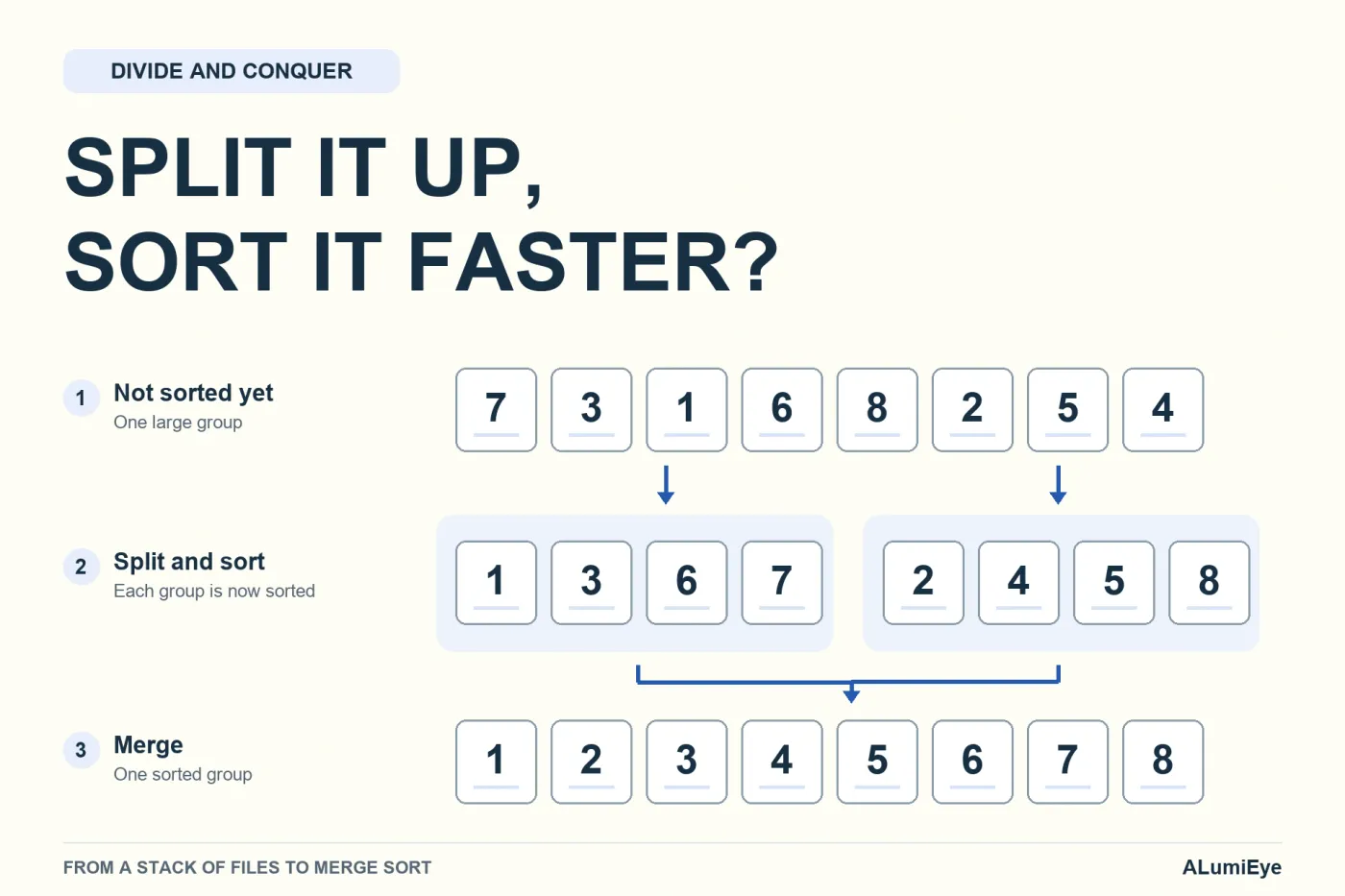
Divide and conquer solves a large problem by solving smaller problems of the same kind, then combining their results. With files, we split the stack in half, sort each half, then merge the two sorted stacks. That algorithm is called merge sort. It saves work because of how the results are merged, not because splitting a stack automatically puts it in order [1].
Let us start with eight sheets of paper. From there, we will see why the same idea works even when the data is too large to fit entirely in a computer’s memory.
Divide and conquer: who handles the smaller pieces?
Suppose the eight files are arranged as follows: Lan, Chi, An, Hà, Minh, Bình, Giang, Dung. In this illustrative example, we sort only by given name, and all the initial letters are different. We do not yet need harder rules for duplicate names or the ordering of Vietnamese diacritics.
Split the stack in half. One stack contains Lan, Chi, An, Hà. The other contains Minh, Bình, Giang, Dung. Both are still jumbled, but each now has only four sheets.
You could hand each stack to a different person. But whoever receives one faces the original question again: “How do I sort these four sheets?” We give the same answer: split it into two more stacks, each with two sheets.
Repeat once more, and every group contains just one sheet. A sheet on its own cannot be out of order. This is the base case: a task so small that its answer is immediate, like a stack containing only An’s file.
Reusing the same solution on a smaller input is called recursion. Here, the request “sort this stack” becomes two requests of the same kind, each involving fewer sheets. Every round must move closer to a stopping point. If the requests keep coming but the stack never shrinks, the work will never end.
At this point, though, the desk merely holds eight separate sheets. Dividing them has not produced the final list. The other half of the story is the merge.
Why is merging two sorted stacks easy?
Suppose two smaller stacks are already sorted from front to back. On the left are An, Chi, Hà, Lan; on the right are Bình, Dung, Giang, Minh. You need a single stack, also sorted by name.
There is no need to search all eight sheets for the first name again. Look only at the two front sheets: An and Bình. An comes first, so move An to the output stack, revealing Chi on the left.
Now compare Chi with Bình. Bình comes first, so take Bình. Continue by comparing the two names currently at the front:
| Names being compared | Name taken next | Output so far |
|---|---|---|
| An and Bình | An | An |
| Chi and Bình | Bình | An, Bình |
| Chi and Dung | Chi | An, Bình, Chi |
| Hà and Dung | Dung | An, Bình, Chi, Dung |
| Hà and Giang | Giang | An, Bình, Chi, Dung, Giang |
| Hà and Minh | Hà | An, Bình, Chi, Dung, Giang, Hà |
| Lan and Minh | Lan | An, Bình, Chi, Dung, Giang, Hà, Lan |
The left stack is empty. Append the remaining Minh without another comparison. In this example, merging the two four-sheet stacks takes seven name comparisons.
Why can we not overlook a name that should come earlier? Because no sheet behind Chi comes before Chi, and the same is true behind Bình. If Bình comes before Chi, Bình must come before every remaining sheet in either stack.
The order within each stack lets us look only at the two fronts. Each sheet is removed exactly once during this merge. We do not rummage through sheets we have already processed. The merging work grows in proportion to the total number of sheets in the two stacks [1].
That is what a useful division must produce: smaller results with structure that helps the next step. If combining them means starting over, we have not saved anything yet.
How do eight sheets split down and merge back up?
Return to the original stack. We do not begin with two sorted four-sheet stacks, so we must build them from smaller groups. Merge Lan with Chi to get Chi, Lan; merge An with Hà to get An, Hà.
Merge those two pairs to get An, Chi, Hà, Lan. In the other half, Minh and Bình become Bình, Minh; Giang and Dung become Dung, Giang. Merge again to get Bình, Dung, Giang, Minh.
Only now do we perform the eight-sheet merge shown in the table above. Every step follows the same rule: merge only groups that are already sorted internally.
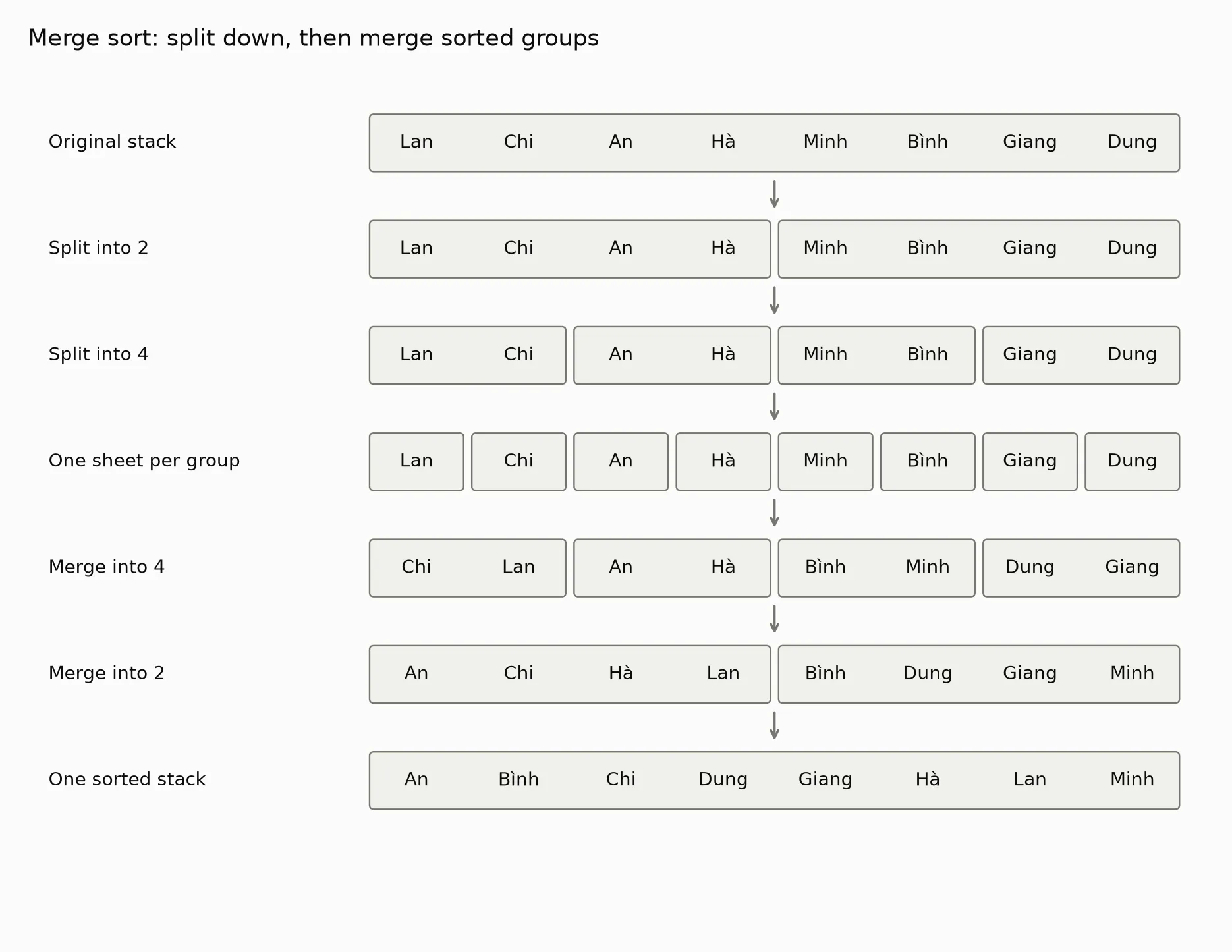
The diagram lays out every group so the process is easy to follow. A recursive program typically finishes the left branch, then the right branch, then merges them. It does not necessarily keep all seven rows in memory.
We can also skip the downward part and start directly with single-sheet groups. Merge pairs, then groups of four, eight, and so on. This is bottom-up merge sort. It does not use recursion, but keeps the same merging structure [1].
Recursion, then, is a way to organize a program, not a magic source of efficiency. You could write the tasks on paper or perform them sequentially with loops. What matters is how the smaller groups are processed and how their answers fit together.
Why do more rounds mean less work overall?
At first glance, merge sort seems to take a roundabout route. Three splitting levels followed by three merging levels, while repeatedly choosing the smallest name looks direct. But we need to count how many sheets get revisited each time.
With the selection approach, eight sheets require seven comparisons to find the first name. The seven remaining sheets require six comparisons to find the next. The total is 7 + 6 + 5 + 4 + 3 + 2 + 1 = 28 comparisons.
This is how selection sort is counted: each round finds the smallest item in the unsorted portion, like removing files from the stack one by one. Its comparison count does not decrease just because the input happens to be sorted already [2].
With merge sort, each merge level handles only eight sheets in total. The first has four pairs, the next has two groups of four, and the last has one group of eight. The number of groups decreases, but the total amount of paper does not increase.
The number of levels grows slowly too. Eight sheets need three merge levels; sixteen need four; thirty-two need five. Doubling the stack adds just one level, rather than doubling the number of levels.
Now we can introduce notation. Let be the number of files. When is a power of 2, it takes halvings to reach a single sheet. Here, a logarithm simply counts how many times we halve the stack. It is not a new operation on the files.
Each merge level does work proportional to , and there are about levels. The work therefore grows as , rather than the roughly comparisons used by selection sort [1] [2].
Complexity describes that pattern of growth. Think of it as estimating the work as the stack gets thicker, not timing a particular person with a stopwatch. The notation expresses an upper bound on the growth rate. It does not say the number of seconds equals that expression.
| Illustrative number of files | Selection sort comparisons: | The scale marker |
|---|---|---|
| 8 | 28 | 24 |
| 1,024 | 523,776 | 10,240 |
| 1,048,576 | 549,755,289,600 | 20,971,520 |
The last column is calculated from the formula. It is not the exact comparison count for every run of merge sort. For the eight names in the diagram, the program below actually uses 17 comparisons: four at the pair-merging level, six at the next level, and seven at the last.
A difference in comparison counts does not translate directly into the same speedup. The computer must also read, write, and move data. Comparing long names differs from comparing integers. But as the input grows, avoiding a near-complete scan of the stack every round changes the scale of the work.
You may recognize the halving idea from binary search in databases. The difference is that a search follows only the relevant half and discards the other. Sorting must process both halves, so its work does not become merely logarithmic.
What if the stack does not fit on the desk?
A computer needs to sort a log file by timestamp. As an illustrative example, suppose the file is 100 GB, while the program can dedicate only part of its RAM to sorting. RAM is like the desk surface: data is brought there for convenient processing, while storage is like a filing cabinet.
We cannot pretend the whole cabinet fits on the desk. Instead, read a portion that fits in memory, sort it, and write it to storage as an ordered segment. Then move on to the next portion.
These sorted segments are called runs. Imagine several boxes of files, each already arranged by name, but with no overall order across the boxes. What remains is to merge them [3].
To merge two files, the program does not need to load both in full. It keeps a portion from the front of each in a buffer, like placing a small bundle from each box on the desk. Take the earlier item and put it in an output buffer. When an input bundle runs out, read the next one.
When the output buffer fills, write it to storage and continue. This lets the final file be many times larger than RAM. Only the portions currently being processed need to fit in memory, not the entire dataset [3].
This is external sorting: sorting data that does not fit in main memory by combining work in RAM with reads and writes to external storage. The initial portions can be sorted using a different algorithm. What carries over here is the advantage of merging segments that are already ordered.
Why not merge only two at a time?
With many runs, merging two at a time may require several passes through the whole dataset. Each pass reads and writes intermediate results again. Trips between the cabinet and the desk may now matter more than a few name comparisons.
We can merge several runs at once, provided RAM has enough room for the buffers and bookkeeping. The program chooses the smallest item among the currently available run fronts. Merging more runs in one pass can reduce the number of full-data read-and-write passes [3].
However, more runs also require more buffers and more work to choose the next item. Temporary files occupy storage space, and memory allocation must account for auxiliary data. “The machine has 16 GB of RAM” is not a reason to load exactly 16 GB of file data at once.
What we count has changed: not just name comparisons, but also the amount of data moved. Splitting and merging remain useful, but a practical design must suit the desk and cabinet available.
Does divide and conquer mean more workers always help?
Two independent stacks let two people sort at the same time. But a person working alone can still sort the left stack and then the right. The algorithm still reduces the work compared with repeatedly selecting the next name, even without any help.
Parallel processing means several people or processors work simultaneously. The problem’s structure makes that possible; it does not happen automatically when we split a list in half. A program needs a way to assign tasks, wait for results, and coordinate memory access.
Even if two people sort their halves quickly, the simple final merge is still performed by one person. With a small stack, assigning and handing over the work may take longer than the time saved. We cannot look at a splitting tree and conclude that doubling the workers will halve completion time.
Splitting has two other limits. The first is merge cost. If every merge means taking all the files and sorting them again using the original slow method, the work saved in the branches can be lost. Merge sort gains its advantage by not doing that.
The second is space. A conventional merge sort uses auxiliary memory proportional to the number of items [1]. On the desk, that is the empty area needed for the output stack while the two source stacks are still there. The question is not just “Are there fewer comparisons?” but also “Is there room to perform this merge?”
What if the smaller tasks keep repeating?
In the file example, the two halves contain different sheets. Even if two sheets both say Lan, they remain separate records, not the same request assigned twice.
Other problems repeatedly ask for exactly the same smaller task that has already been solved. Imagine two people asking you to count the same box of files. Once you have counted it, saving the result makes more sense than opening the box and counting again every time.
That is when remembering results and dynamic programming are worth considering. The article on the Tower of Hanoi and remembering instead of recalculating explores this kind of question. Repeated subproblems are a reason to consider reuse, not a guarantee that making a table will make everything fast.
“Split it up” is therefore not a complete solution. We must know whether the pieces genuinely get smaller, whether we keep solving them again, and whether their results can be combined at a reasonable cost.
Draw the split and merge levels yourself
The Python code below generates Figure 1 and counts the name comparisons made during merging. It uses eight fixed names, with no random data. You only need matplotlib. Run it from the directory where you want the images/ folder saved.
The downward part builds smaller groups. The upward part merges pairs of groups using two positions, i and j, like two fingers resting on the fronts of two stacks. This illustration keeps every row so it can draw them. It is not a memory-efficient implementation for large files.
from pathlib import Pathimport matplotlibmatplotlib.use("Agg")import matplotlib.pyplot as pltfrom matplotlib.patches import FancyBboxPatch
names = ["Lan", "Chi", "An", "Hà", "Minh", "Bình", "Giang", "Dung"]comparisons = 0

def merge(left, right):    global comparisons    result, i, j = [], 0, 0    while i < len(left) and j < len(right):        comparisons += 1        if left[i] <= right[j]:            result.append(left[i])            i += 1        else:            result.append(right[j])            j += 1    return result + left[i:] + right[j:]

rows = [[names]]while any(len(group) > 1 for group in rows[-1]):    smaller = []    for group in rows[-1]:        mid = len(group) // 2        smaller.extend([group[:mid], group[mid:]])    rows.append(smaller)
runs = rows[-1]while len(runs) > 1:    runs = [merge(runs[i], runs[i + 1]) for i in range(0, len(runs), 2)]    rows.append(runs)
assert runs[0] == sorted(names)assert comparisons == 17print("Result:", ", ".join(runs[0]))print("Comparisons during merging:", comparisons)
plt.rcParams.update({"font.family": "DejaVu Sans", "font.size": 12})fig, ax = plt.subplots(figsize=(11, 8.5), dpi=170)fig.patch.set_facecolor("#fcfcfb")ax.set(xlim=(-3.3, 8.2), ylim=(-0.8, 7.2))ax.axis("off")labels = ["Original stack", "Split into 2", "Split into 4", "One sheet per group",          "Merge into 4", "Merge into 2", "One sorted stack"]for row, (groups, label) in enumerate(zip(rows, labels)):    y, x = 6.3 - row, 0    ax.text(-3.1, y + 0.25, label, va="center", color="#0b0b0b")    for group in groups:        width = len(group)        box = FancyBboxPatch((x + 0.06, y), width - 0.12, 0.5,                             boxstyle="round,pad=0.02,rounding_size=0.04",                             facecolor="#f0f0eb", edgecolor="#77776f", lw=1)        ax.add_patch(box)        for offset, name in enumerate(group):            ax.text(x + offset + 0.5, y + 0.25, name, ha="center",                    va="center", color="#0b0b0b")        x += width    if row < len(rows) - 1:        ax.annotate("", xy=(4, y - 0.4), xytext=(4, y - 0.08),                    arrowprops={"arrowstyle": "->", "color": "#77776f", "lw": 1.5})ax.set_title("Merge sort: split down, then merge sorted groups",             loc="left", fontsize=15, color="#0b0b0b", pad=18)fig.tight_layout(pad=1.5)output = Path("images/chia-de-tri/chia-va-ghep-en.png")output.parent.mkdir(parents=True, exist_ok=True)fig.savefig(output)plt.close(fig)
Output:
Result: An, Bình, Chi, Dung, Giang, Hà, Lan, MinhComparisons during merging: 17Python compares strings by character code point, rather than automatically applying full Vietnamese name-sorting rules. The eight chosen names have different initial letters and give the order illustrated here. This drawing routine is also written specifically for eight names. It is not a general-purpose sorting function for arbitrary list lengths.
You can rearrange the eight names and remove the comparisons == 17 assertion to see how the comparison count changes. The final result is still checked against sorted(names), but the path and comparison count need not stay the same.
Back to the stack on the desk
You began with a stack of paper and a familiar approach: find the first name, remove it, then search again. Merge sort does not make you read names faster. It changes the organization so you do not keep rummaging through sheets you have already seen.
When the stack grows larger than the desk, the same structure lets you work on portions and gradually merge them from boxes. But the benefit is not free. You need space for the output, you must move paper, and you must choose an appropriate way to merge.
The question worth keeping is not just “How many pieces can I split this into?” Ask one more: once those pieces are finished, can I use their results to complete the larger task without starting over?
Free geometry illustrations for students and teachers: EyeViz.
Tài liệu tham khảo
- [1]Robert Sedgewick and Kevin Wayne. Mergesort. Algorithms, 4th Edition, Princeton University.
- [2]Robert Sedgewick and Kevin Wayne. Elementary Sorts. Algorithms, 4th Edition, Princeton University.
- [3]External Sorting. OpenDSA, Virginia Tech.