Changed your profile picture? Why others see the old one
Changed your profile picture but others still see the old one? Explore caching, stale copies, replacement algorithms, and the answers AI can safely reuse.

Mục lục
You have just changed your profile picture. The new one appears on your phone. You message a friend: “Seen my new picture?”
“What picture? It still looks the same.”
You check your laptop. Sure enough, the old picture is there. Refresh. Still there. For a moment, you wonder whether you forgot to save.
One possible cause is a cache, which keeps a copy to reuse next time instead of fetching everything again. The new picture has been saved at the source, but somewhere along the path to the viewer, an older copy is still being used. Caching does not explain every profile picture problem; this is simply a familiar way to see the mechanism at work.
Why would a system hold on to something outdated? To answer that, imagine your computer having to do everything from scratch each time you reopen a web page.
What if every visit meant fetching everything again?
You open a café’s website to check the menu. A few minutes later, you open it again to share with friends. The photos are the same. So are the café’s name and address.
If your device already has those pictures, downloading them again only makes you wait and uses more bandwidth. Once you have looked up a phone number, you usually write it down rather than search the directory every time you want to call.
A cache does the same with data. When the system needs something, it first checks what it has saved. Finding a usable copy is a cache hit. Finding nothing, or finding a copy it cannot use, means going back to the source: a cache miss.
The “source” need not be an image file. It could be a database, an expensive calculation, or another service’s response. The benefit comes from work the system avoids repeating.
This echoes the idea in the Bloom filter article: put a cheap check in front of expensive work. A Bloom filter can rule out unnecessary lookups; a cache can hold the result itself.
Why does your old profile picture still appear?
Imagine a website stores your picture at /anh-dai-dien/lan.jpg. Your laptop downloads it at 9:00. The server allows that copy to be reused for ten minutes.
At 9:02, you change your picture. The content at that address changes, but your laptop does not necessarily know. If the cache policy still permits the saved copy, it may continue displaying the picture downloaded at 9:00.
“Still fresh under the policy” is different from “the latest version at the source.” Freshness means the rules allow the copy to be used. It does not prove nothing has changed in the meantime.
In HTTP, a server can specify this window with Cache-Control: max-age=600. Once a saved response is no longer fresh under the rules, a cache generally needs to validate it or obtain another response before serving it. Expiration does not mean the file is immediately deleted from disk[2].
This lifetime is often called TTL, short for time to live. A longer TTL allows more reuse, but can also extend the period before updates become visible. A shorter one leads to more frequent validation or replacement.
There is no single sensible value for everything. A finished article’s illustration can stay cached for a long time; the availability of seats on a bus needs different treatment.
Where is the copy you are looking at?
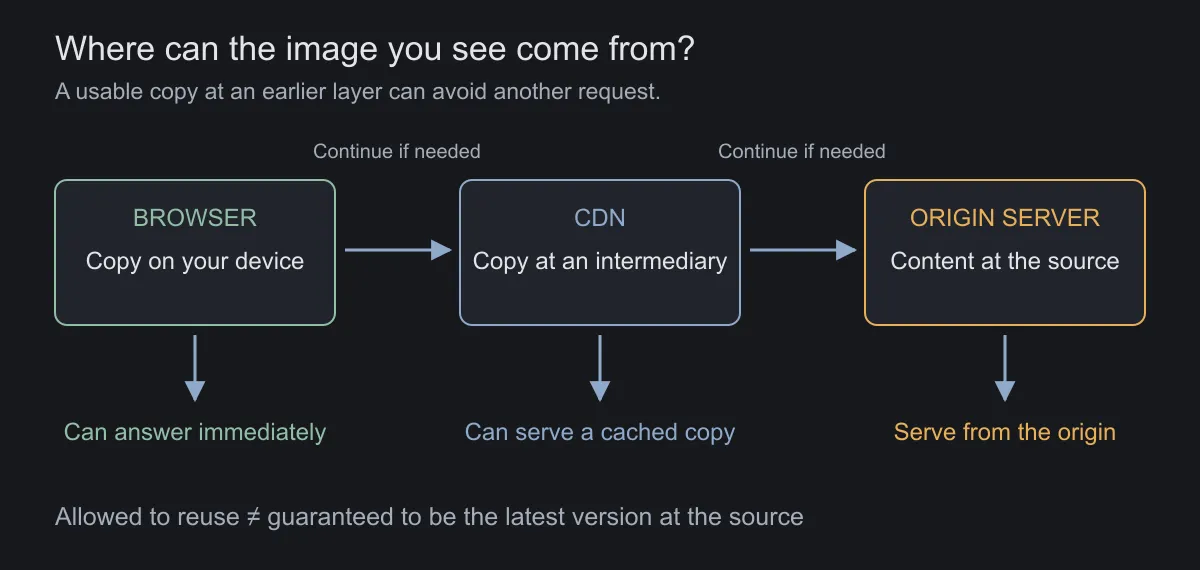
Your laptop is not the only place that can store an image. A simplified path might look like this:
Browser → CDN → Origin serverThe browser keeps a copy on your device. A CDN, or content delivery network, can keep another copy near the viewer’s region. The origin server holds the content those other places fetch. A more complex application may also have server-side caches for profile data or query results[1].
Clearing your browser’s copy therefore does not guarantee a new image: the next request might encounter an older copy at another layer. Conversely, if the profile data still points to the old image address, fetching that image perfectly correctly does not solve the problem either.
Your phone and laptop do not necessarily hold the same copy, fetch it at the same time, or go through the same intermediary server. Different screens do not necessarily mean one device is malfunctioning.
Using the network and downloading the image are different things
Follow one image across three page visits. On the first visit, the device has nothing and must receive the content from the server serving it. Next time, it may use its saved copy immediately. On another visit, it might ask whether that copy is still valid before deciding whether to download it again.
| Situation | Does it contact a server over the network? | Is the full image content transferred again? |
|---|---|---|
| The browser copy can be used immediately | Not for that image request | No |
A validation request receives 304 Not Modified |
Yes | No |
| The server sends replacement image content | Yes | Yes |
These are three different paths, even if you end up seeing the same picture. “No new image download” does not necessarily mean “no server request.” A network request also does not prove the data came from the origin: a CDN may have answered[1].
These steps are almost invisible to the user. To the operator, they differ in latency, bytes transferred, and backend work. Near the end of this article, you can observe them in your own browser.
Must you clear every cache to see the new picture?
There is an intuitive alternative: give the new image a new address.
Instead of overwriting lan.jpg, the system saves lan-v2.jpg and updates the profile to point to it. The old copy can remain cached, but once the page receives the new address, it requests the new image. Web assets often include a content hash in their filenames to distinguish versions. This approach is commonly called cache busting[1].
Sometimes there is no need to transfer the entire file again. The cache asks the source whether its version still matches. If it does, the source returns 304 Not Modified, and the existing copy can keep being used. Validators such as ETag support this check[2].
Another option is to actively invalidate a saved copy when data changes. But the more places that hold copies, the more carefully you must identify which ones need notifying and what happens when a notification arrives late.
Changing the image filename handles version identity; the profile’s image pointer still needs updating. Each solution untangles part of the problem.
You cleared the cache. How did the old picture come back?
Step away from the image file and look at the profile data: a record containing your name and profile picture address. The application caches this record to avoid asking the database every time someone visits your profile.
A straightforward approach is to check the cache when reading, fetch from the database on a miss, then save the result. When updating, change the database and remove the cached copy. This arrangement is commonly called cache-aside.
Each request looks reasonable in isolation. But someone viewing a profile and someone editing it can arrive at the same time.
Suppose An opens your profile just as you change your picture:
| Time | An’s read request | Your picture update request |
|---|---|---|
| 1 | Finds no profile in the cache | |
| 2 | Reads profile version 1 from the database, but has not cached it yet | |
| 3 | Saves profile version 2, pointing to the new picture | |
| 4 | Deletes the profile’s cache key | |
| 5 | Writes the previously read version 1 into the cache |
You saved the new picture. The cache deletion ran too. Yet a later request can still read version 1, because An’s request finished late and put the old data back.
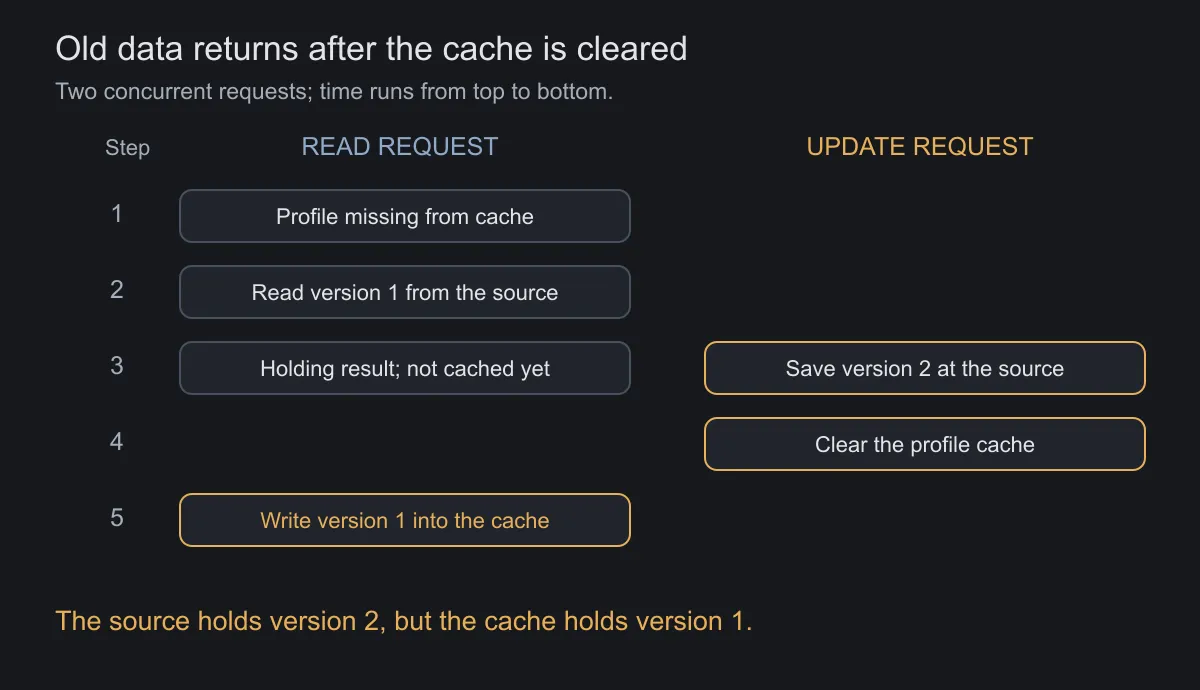
This is a race condition: the outcome depends on how operations interleave. Keeping a cache consistent takes more than remembering to call delete[7].
Is reversing the two steps enough?
If you clear the cache before updating the database, a reader can use the gap to fetch old data and refill it. If you also write the new data into the cache, an earlier request that finishes late can still overwrite it, unless something prevents that.
One approach is to attach versions to data and accept only appropriate results. But a version number alone is not enough: if you erase every trace of the latest version, how can the recipient know to reject an older one? The comparison needs to happen atomically with the write, and version information needs to survive in the appropriate place. Coordinating locks or an ordered update stream are other options, with added waiting and complexity.
The two-request example above is deliberately simplified. A real system must also consider failed requests, delayed notifications, and database replicas that have not caught up. No single isolated operation guarantees that every layer immediately sees the latest version.
The design question becomes: how long may this data remain stale, and how will the system detect or repair the discrepancy? For a profile picture, an acceptable window and a TTL as a fallback may suffice. Access permissions have different requirements.
Memory is limited. What should the cache forget?
Even if updates are handled, we cannot keep everything forever. A design question now becomes an algorithm problem.
Give the cache three slots, each holding one image. Requests arrive in the order A, B, C, A, D.
After the first three, all slots are full. The next request for A is a hit. When D arrives, something must go.
LRU, least recently used, removes the item that has gone longest without being used. A recent request is treated as a hint that another might follow. A was just used in this example, so B goes.
LFU, least frequently used, considers the number of uses. A has been requested twice; B and C once each. B and C tie for the lowest frequency, so another rule must break the tie. Real systems may use approximate counters and gradually reduce the influence of old history[3].
Both approaches predict the future from the past. A bulk read can push useful items out of LRU. LFU can cling to items that were once popular but no longer matter.
A quick scan can make the cache forget the wrong things
Keep the three-slot cache. Throughout the morning, users keep viewing A and B: A, B, A, B, A, B. Each has been requested three times.
At noon, a task reads C, D, and E once each. Users then return to A and B.
With LRU, C fills the empty slot. D evicts A, which was used less recently than B. E then evicts B. When users return, both A and B must be fetched again.
With a simple LFU, A and B have higher counts than the items read only once. C fills the empty slot, then gives way to D, which gives way to E. A and B are still there when users return.
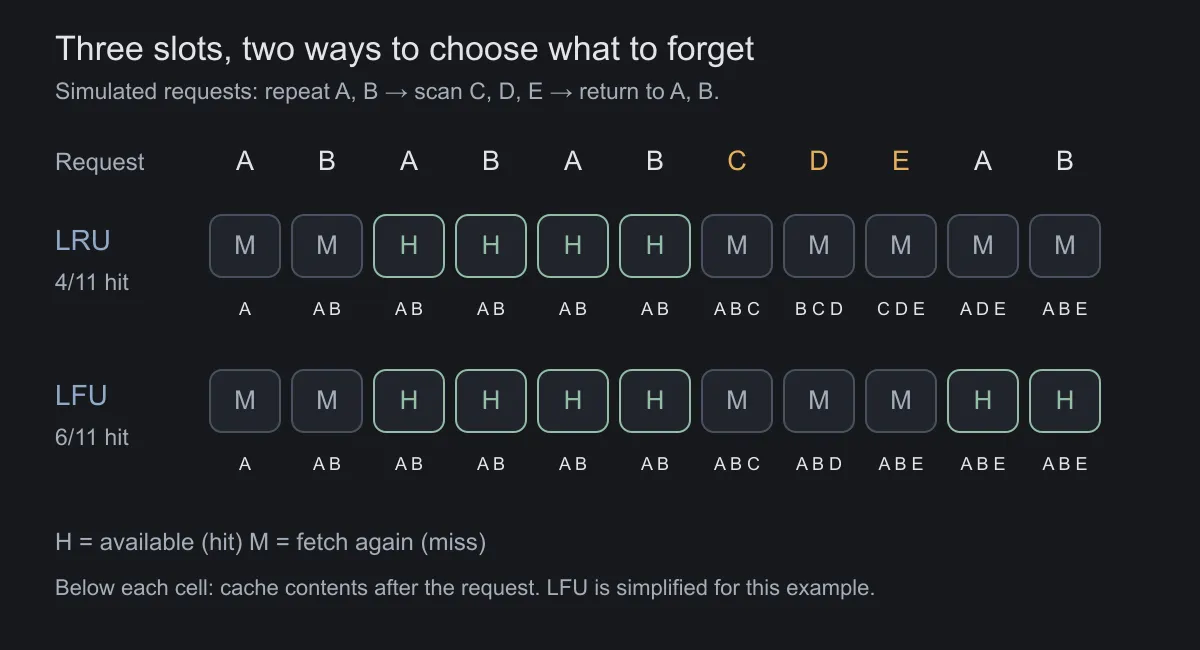
Change the story slightly and the conclusion changes. If everyone switches permanently to D and E at noon, continuing to prioritize A and B because of the morning’s history can waste space. Counters therefore need ways to forget the past, or policies need to combine several signals.
Letter-based examples also hide another detail: real images differ in size. Keeping one very large image can take the space of many small ones. Maximizing hits, bytes saved, and processing time avoided need not produce the same choice.
A cache that serves 90 thumbnails but misses 10 huge files may have a high request hit rate while still transferring a lot of data. “What is the hit rate?” should therefore come with “What work does each hit avoid?”
It is easy to confuse eviction, removing something to make space, with invalidation, making a copy unusable because it is no longer appropriate. An old image viewed repeatedly may be protected very effectively by LRU. The algorithm is doing its job of retaining frequently revisited items even though the content needs updating.
When everyone comes for a fresh copy at once
Consider a hypothetical workload of 1,000 requests per second for the same content. The cache answers 99%, so the source handles about 10 requests per second.
Now the most popular cached item expires. If every request sees a miss and fetches it independently, the source can suddenly receive far more work than usual. This is a cache stampede.
Responses include coalescing duplicate requests so only one fetch proceeds, or refreshing before expiration. Where the content permits it, the system can temporarily serve a stale copy while refreshing. Spreading expiration times also helps avoid many items needing to be fetched simultaneously[4].
The choice is practical. Waiting a little longer for a new profile picture may be acceptable. Continuing to trust a cached permission after access has been revoked has different consequences. A cache policy needs to reflect what the data means.
The day the cache is completely empty
There is another scenario: the cache cluster has just been replaced, or the application has restarted with empty memory. Even the most popular items are missing. This is a cold cache.
Return to the 1,000-request example. The source previously saw about 10 requests per second. While the empty cache is being filled, that workload can approach 1,000, depending on duplicate content and request coalescing. Adding memory does not solve this transition: empty slots still need filling.
Microsoft emphasizes considering cache unavailability and whether the data source can handle the increased demand[9]. A system that runs well with everything already cached has not necessarily proved it can restart under the same load.
You can preload popular content and move users over gradually. But preloading the entire dataset consumes resources and may itself overload the source. Choosing what to warm up is another question about access patterns.
Coalescing duplicate requests and limiting load do different jobs. Coalescing lets a thousand people requesting image A wait for one fetch of A. If they request a thousand different images, it helps less; the system still needs to control concurrent work reaching the source.
That connects to the article on sliding windows and rate limiting. A cache reduces work under favorable conditions; load limits determine how much work the system accepts when those conditions disappear.
Can AI reuse an answer?
A chatbot receives two questions:
“Where do I change my profile picture?”
“Which menu lets me update my profile photo?”
The strings differ, but the same instructions may answer both. A cache matching exact wording would miss that opportunity.
A semantic cache turns a question into an embedding and looks for nearby questions. It uses the same intuition of placing similar things close together discussed in image search. Once it finds a suitable entry, the system can reuse a saved answer instead of calling the model to generate the entire response again[5].
Now change the questions:
“How do I allow other people to see my photos?”
“How do I stop other people from seeing my photos?”
Most words overlap; the requests point in opposite directions. A similarity threshold alone does not guarantee that two questions can share an answer.
“Can I get a refund?” can be identical across users while depending on their orders, regions, timing, and applicable policies. Context, account scope, document versions, and freshness therefore matter alongside semantic closeness. An answer within a conversation can also depend on earlier turns[6].
To reuse an answer, the system needs to resolve a harder question: do the conditions that made the old answer correct still hold?
The same sentence in different conversations
You are asking a chatbot how to change a picture on your phone. Someone else is asking about the website. Both of you send: “Where is that button?”
If the final sentence alone becomes the cache key, the system might give mobile instructions to the web user. Identical wording is not enough, because earlier turns determine what “that button” refers to.
Including history in the key can prevent this mismatch, but reduces opportunities to match. Generalizing the history can improve reuse while also dropping an important condition. This is part of the trade-off between quality and hit rate, beyond choosing a similarity score.
Reuse what has been read, but still produce a new answer
Not every AI cache stores final answers.
Imagine a customer support assistant. Every request starts with the same long instructions and product documentation, followed by the individual user’s question. If the beginning matches, the system can reuse computation for that prefix, then process the new portion and generate an answer.
This is the idea behind prompt caching, or prefix caching. In Transformer models, one kind of intermediate state is a KV cache. Think of it as computational notes made while processing text already read; it is not a written summary. Anthropic’s documentation describes prefix matching and storing computational state, which differs from saving an answer for reuse[8].
| Reuse method | What is saved? | Is a new answer generated for this request? |
|---|---|---|
| Answer cache with an exact key | A generated answer and its associated conditions | Not needed if the original answer can be returned |
| Semantic cache | An answer plus a semantic representation for finding nearby candidates | Not needed if a candidate passes suitability checks |
| Prefix cache | Computational state for a shared input prefix | Yes; the new portion is processed and an answer generated |
With prefix caching, different questions can benefit from the same documentation placed first. But two documents with similar meanings do not necessarily share computational state: prefix matching has different requirements from semantic search. Changing the opening content or its order can shorten the reusable portion.
Prefix caching avoids some input processing; it does not remove the cost of generating each output token, and it consumes memory. A product saying it “uses caching” therefore does not tell you which step it is saving work on.
A connection to how we look at AI businesses
Once you understand caching, “How much does another million uses cost?” becomes a more interesting question.
A product answering stable how-to questions can have many opportunities for reuse. An assistant reading private records and handling a fresh situation for each person has a different workload. Equal question counts do not imply equal serving costs.
From an investment perspective, this gives us a way to ask about scalability: what must actually be computed again, what can be shared, and does reuse preserve quality? This is reasoning from the operating mechanism, not a conclusion about any particular company’s margins.
A cache also requires storage, lookups, and operational work. A semantic cache may need to compute an embedding before it knows whether a suitable answer exists. A high hit rate matters only if the savings exceed the additional costs and the answers still meet requirements. AWS likewise recommends tracking both cost effectiveness and quality[6].
This connection continues the idea in the electricity behind an AI prompt (article in Vietnamese): look past the interface to the work happening behind it. With caching, some efficiency comes from work that no longer has to happen again.
One million questions, two cost structures
Try a simplified model for an answer cache, rather than a prefix cache. Every figure below is hypothetical, not a provider’s price list.
Generating a fresh answer costs 100 cost units. Every question incurs 2 units for cache lookup and validation. Maintaining storage and writing new entries adds 1 million units over the period. Assume fresh answers all cost the same and every hit has passed quality checks.
The cost of serving one million questions is then:
Cost = 1,000,000 × [2 + (1 − hit rate) × 100] + 1,000,000| Hypothetical case | Valid hit rate | Requests needing a fresh answer | Total cost |
|---|---|---|---|
| No cache | — | 1,000,000 | 100 million units |
| Product A: repeated questions, stable content | 80% | 200,000 | 23 million units |
| Product B: private, frequently changing content | 10% | 900,000 | 93 million units |
| A cache that finds no reusable answers | 0% | 1,000,000 | 103 million units |
Under these assumptions, caching needs a hit rate above 3% to cost less than no cache: the avoided generation must cover 2 million units of lookups and 1 million of maintenance. In reality, these costs can change with capacity, writes, and validation complexity. The 3% threshold belongs only to this model.
The useful takeaway is the structure of the question. One product can serve more people with less new computation; another needs to handle almost every request separately. Sharing documentation is also different from sharing answers.
For investing, this mechanism helps examine a cost argument: what kinds of requests drive growth, are savings measured on real workloads, and do users receive the promised quality? Margins also depend on pricing, staffing, customer acquisition, and other expenses. Understanding caching illuminates part of a business model, not the whole of it.
See caching in your own browser
To try it, open a page containing images in a desktop browser, open developer tools, and select Network. Many browsers provide access through F12 or the Inspect menu. Leave Disable cache unchecked for your first observation.
Filter the list to images, select a file, and inspect its address, status, transferred size, and headers. Then revisit the same page through ordinary navigation. Depending on the page’s policy and browser behavior, you may see a memory cache hit, a disk cache hit, a validation request, or a fresh content download. Not every page exhibits every case.
For another comparison, try a normal reload. Reloading may cause the browser to validate saved responses, so do not assume every reload must produce a hit without network activity. Display labels also vary across browsers.
Two headers worth examining are Cache-Control, which describes reuse policy, and ETag, a validator used to check versions. no-cache permits storage but requires validation before reuse; no-store instructs caches not to store the response. The first name can misleadingly suggest that caching is forbidden altogether[2].
Not seeing 304 does not prove caching is absent. Your browser may reuse a copy without contacting a server, or a CDN may serve its cached content with status 200. This exercise reveals one layer, not the entire path behind it.
Back to the picture that would not change
Next time you change your picture and someone still sees the old one, a copy somewhere may be doing exactly what it was asked to do: hold on to something so the next response can arrive faster.
The world changed before the copy found out.
From a profile picture to an AI answer, the better a system becomes at reuse, the more clearly it needs to know when to stop trusting what it remembers.
Cover photo: Pandu Pratana / Unsplash, used under the Unsplash License.
Tài liệu tham khảo
- [1]HTTP caching. MDN Web Docs.
- [2]Roy Fielding, Mark Nottingham and Julian Reschke. HTTP Caching — RFC 9111. IETF, 2022.
- [3]Key eviction. Redis Documentation.
- [4]Jas Chhabra. Caching challenges and strategies. Amazon Builders’ Library, 2019.
- [5]Semantic cache. Redis Documentation.
- [6]Semantic caching best practices. Amazon ElastiCache Documentation.
- [7]Cache Consistency: Strategies to Keep Data Fresh. Redis.
- [8]Prompt caching. Anthropic Documentation.
- [9]Caching guidance. Microsoft Azure Architecture Center.