Sliding window: why 5 wrong OTPs lock you out for a minute
Behind every "try again in 1 minute" is a rate limiter. From the flaw in counting per clock minute to the sliding window, many servers, and a contest classic.

Mục lục
You type the wrong one-time password for the fifth time, and your banking app says: “Too many incorrect attempts, please try again in 1 minute.” A concert ticket site warns “You are going too fast.” A developer hammering an API gets back 429 Too Many Requests. Three situations, one mechanism: rate limiting, a cap on how many times someone may do something within a span of time.
The question sounds simple: how does a system count “5 attempts per minute”? The best answer is called a sliding window: instead of counting per minute on the clock, the system always looks at exactly the last 60 seconds, a window of time that slides along with every moment. New events come in, events older than 60 seconds drop out, and nothing is ever recounted from scratch.
The first half of this article needs no programming: it shows why the “naive” way of counting has a hole at second 59, and how the sliding window closes it. The second half is for readers who want to go deeper: how a rate limiter works when hundreds of servers share the job, and why the same idea is a classic in competitive programming, only a little harder than binary search.
What is rate limiting?
Picture a building’s security guard with one instruction: let in at most 100 visitors an hour. That guard is a rate limiter. On the Internet the “visitors” are requests sent to a server: a login attempt, a click on “buy ticket”, an app asking for a stock price.
Almost every large system has such a guard, for three reasons.
Stopping attackers from guessing. A six-digit OTP has a million possible values. With unlimited tries, a program would go through all of them in minutes. Allow only 5 wrong attempts per minute, though, and trying a million values takes almost 140 days, while the code itself lives for a few minutes. Passwords work the same way: limiting failed logins is the cheapest defence against password guessing.
Stopping one client from slowing down everyone. A buggy app calling an API in an endless loop can send thousands of requests a second. Without a limit, one customer like that can slow the system down for everyone else. A rate limiter keeps each user to a fair share.
Keeping costs under control. Every request costs money: server time, bandwidth, sometimes a fee to another service (sending an SMS with an OTP costs real money). Limiting requests limits how much money one user, or one attacker, can burn.
When a request is blocked, the server answers with HTTP status 429 Too Many Requests, defined in 2012, optionally with a Retry-After header saying how long to wait before trying again[1]. The “try again in 1 minute” on your phone is usually that number, rewritten to be readable.
Naive counting and the hole at second 59
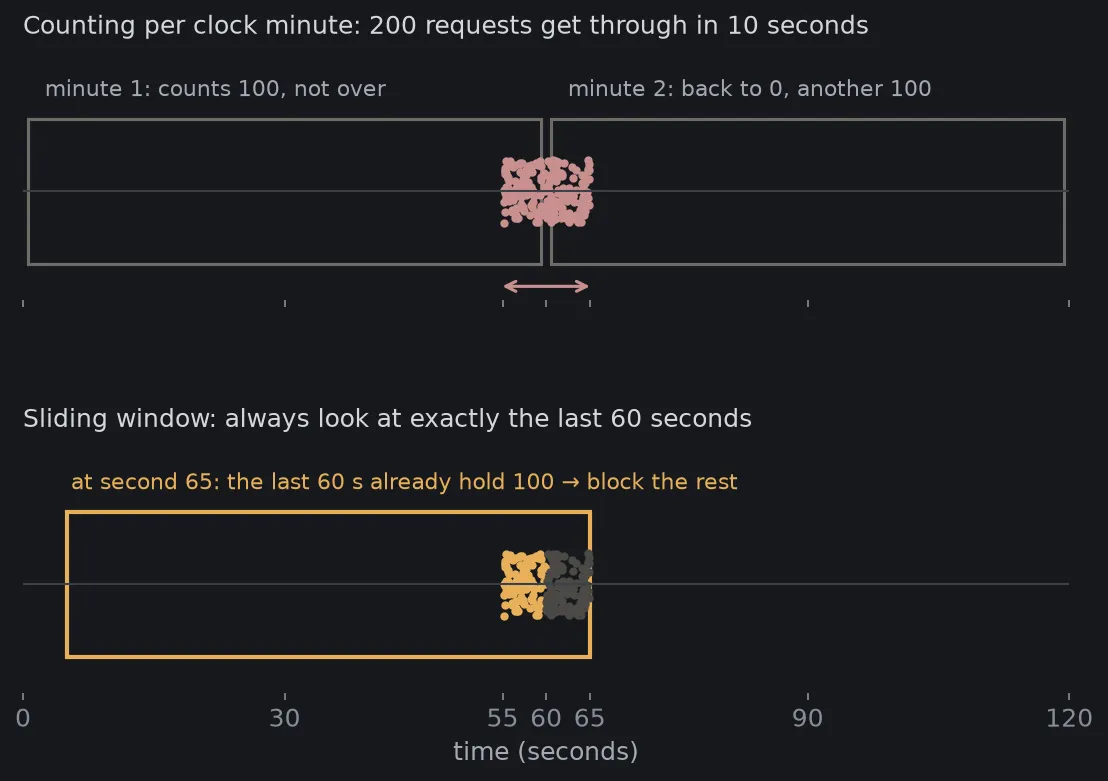
The simplest way to count “at most 100 requests per minute” is to use a wall clock. Every time the minute changes (10:00, 10:01, 10:02…), wipe the board back to 0. Each request adds 1. Below 100, let it through; at 100, block until the minute ends. This is called a fixed window.
It is extremely cheap: each user needs just one number. And most of the time it works well. But watch what a sharp attacker does:
- Between seconds 55 and 59 of 10:00, they send 100 requests. The counter reaches 100, not over the limit. All of them get through.
- At second 00 of 10:01 the board is wiped back to 0. Between seconds 00 and 05, they send another 100. The counter reaches 100 again. All of them get through again.
Result: 200 requests get through in just 10 seconds, twice the limit, without breaking any rule. The hole is that the rule says “per minute” but the system reads it as “per minute on the clock”. The two differ exactly in the seconds around the moment the minute hand jumps.
For a news site, 200 requests instead of 100 may not matter. For an OTP, it means an attacker gets twice as many guesses as you think. For an overloaded system, it is a double-sized wave hitting at its weakest moment.
The sliding window: always look at exactly the last 60 seconds
The fix is to change the question. Instead of “how many requests so far this minute?”, the system asks “how many requests in the 60 seconds up to right now?”
Imagine a window exactly 60 seconds wide laid over the timeline. Its right edge is always “now”, so it slides to the right as the clock ticks. Each new request lands at the right edge of the window. Meanwhile, requests older than 60 seconds slide out past the left edge and stop counting. To decide whether to let a request through, just count what is inside the window.
Back to our attacker. At second 00 of the new minute, the window still holds all 100 requests they sent between seconds 55 and 59. There is no “wipe”. Every further request is blocked until the old ones slide out of the left edge, around second 55 of the next minute. In any span of 60 seconds, no more than 100 requests ever get through.
The beauty of the sliding window lies in the word “sliding”: the system never recounts from the start. It does two small things at the two edges: add the new, drop the old. Keep that idea in mind, because it comes back at the end of this article in a different shape.
Three ways to do it in practice
The idea is clear, but “remember every request in the last 60 seconds” has a price. An API serving millions of users cannot store the timestamp of every request for every user. So real systems pick one of a few approaches, each trading accuracy for memory differently.
A sliding window log does exactly what was described above: store the time of every allowed request, drop those older than 60 seconds, count what is left. It is perfectly accurate. The price is memory: a limit of 1,000 requests a minute means storing up to 1,000 numbers per user.
A sliding window counter is a clever approximation. It keeps just two numbers: the request count for the previous minute and for the current one, like the clock-based counter. Then it assumes the previous minute’s requests were spread evenly across that minute. If we are 15 seconds into the current minute, the last 60 seconds consist of these 15 seconds plus the last 45 seconds of the previous minute. The previous minute’s share is estimated as of its count:
Cloudflare, which sits in front of a very large share of the world’s web traffic, uses exactly this approach for its rate limiting service. Tested on 400 million requests from 270,000 distinct sources, only 0.003% of requests were wrongly allowed or blocked[2].
A token bucket takes a different view entirely. Each user has a bucket holding at most, say, 100 tokens. Each request must hand over a token; no tokens, no entry. Tokens are dropped back into the bucket at a steady rate, for example one every 0.6 seconds. A user who has been idle fills the bucket and may send a burst, but over the long run cannot exceed the refill rate. Stripe, the online payments company, uses token buckets for its API[3].
| Method | Accuracy | Memory per user | Allows bursts? |
|---|---|---|---|
| Fixed window (clock minute) | Lets 2× through at the minute boundary | 1 number | Yes, even unintended ones |
| Sliding window log | Exact | Up to the limit | No |
| Sliding window counter | Approximate, tiny error on normal traffic | 2 numbers | Negligibly |
| Token bucket | Exact by its own definition | 2 numbers | Yes, up to the bucket size |
Which one to pick is a design decision. Login and OTP endpoints, where every extra attempt is another guess for an attacker, deserve the exact method. A data API serving millions of customers is much better off with a sliding window counter or a token bucket, where a small error is nothing compared with the memory saved.
When a hundred servers count together
Everything so far assumed a single guard. Real systems often run dozens or hundreds of servers, and a user’s requests can land on any of them. If each server counts on its own, a limit of 100 requests a minute across 10 servers effectively becomes 1,000.
The usual solution is to keep the counter in one shared place that every server asks, typically Redis, an in-memory database that answers in well under a millisecond. For a fixed window, each user is one number in Redis that expires when the minute changes. For a sliding window log, Redis has a built-in structure called a sorted set, well suited to storing timestamps and quickly deleting those older than 60 seconds[4]. Stripe runs its rate limiters on Redis[3], and Cloudflare chose its two-number approximation partly because it needs only a single increment command per request[2].
Even with a shared place, three design questions remain.
Two servers counting at the same moment. If server A reads “99”, server B also reads “99”, both allow their request and both write “100”, then 101 requests actually got through. This is a race condition. The fix is to let Redis read, check and write in one step that nothing can interrupt, using its built-in increment commands or a small script that runs inside Redis itself.
When the counter fails. If Redis stops answering, should the system let everything through (fail-open) or block everything (fail-closed)? There is no universal answer. For a read-only data API, letting everything through is usually better: high load for a while beats taking down the service for every customer. For an OTP endpoint, blocking everything is safer: making users wait a minute beats opening the door wide to code guessers.
Counting by what? By IP address is simple, but a whole café, a school, or thousands of mobile subscribers can share one IP address, and one bad user gets the whole group blocked. By account or API key is fairer, but only works once you know who is sending. That is why login endpoints usually limit by IP and by the account being attacked, while authenticated APIs limit per user, for example by the identity carried in the request’s JWT.
Rate limiters usually sit in the API gateway, the gate in front of every service, so a blocked request never reaches the most expensive part of the system.
The sliding window in competitive programming
Here we leave rate limiters and look at the same idea where it is first taught: programming contests. This part uses a little notation; readers interested only in the practical side can stop here without missing the main idea.
Problem 1: a fixed window. Given a list of numbers and a number , find the largest sum of consecutive numbers. For 3 1 4 1 5 9 2 6 with , the groups of three consecutive numbers sum to 8, 6, 10, 15, 16, 17, so the answer is 17 (the group 9 2 6).
The brute-force way is to add up numbers from scratch at every position. About positions times additions each gives operations. With a million and ten thousand, that is ten billion additions.
The sliding window notices that neighbouring groups almost overlap: 4 1 5 and 1 5 9 share 1 5. Going from one group to the next, just add the new number at the right edge and subtract the old one at the left edge: . Each step costs two operations, and the whole problem drops to . This is exactly the rate limiter’s “add the new, drop the old”, just on a list of numbers instead of a timeline.
Problem 2: a stretchy window. Given a string, find the length of the longest stretch with no repeated character. For abcabcbb the answer is 3 (abc). This is problem 3 on LeetCode, one of the most famous interview questions[5].
This time the window has no fixed length. Keep two pointers, a left edge and a right edge. The right edge moves forward one character at a time. If the new character is already in the window, the left edge jumps to just after that character’s previous occurrence, so the window is free of repeats again. The window stretches while it is valid and shrinks when it is not. Each edge only ever moves forward, never back, so together they take at most steps each: still .
This is where it gets “a little harder than binary search”. Binary search has a single idea: halve. A stretchy window asks you to answer two questions yourself: what invariant does the window keep (here: no repeated character), and when must the left edge move to keep it. Answer those two correctly and the code is just a few lines.
Contest corner: spotting a sliding window problem
A problem usually yields to a sliding window when it asks about a contiguous stretch (a subarray, a substring, a time span) and the condition on the stretch is “monotone”: if a stretch is valid, shrinking it keeps it valid, or if a stretch is invalid, growing it keeps it invalid. That monotonicity is what lets the left edge move only forward and never back.
Five practice problems from easy to hard, all on LeetCode:
| # | Name | Key idea |
|---|---|---|
| 643 | Maximum Average Subarray I | Fixed window, exactly like problem 1 |
| 3 | Longest Substring Without Repeating Characters | Stretchy window, exactly like problem 2 |
| 424 | Longest Repeating Character Replacement | Stretchy, with a harder invariant: characters to replace ≤ |
| 76 | Minimum Window Substring | Find the shortest window containing all the given characters |
| 239 | Sliding Window Maximum | The maximum of every window: needs a double-ended queue (deque) |
Problem 239 is the natural next step: a sum can be added to and subtracted from, but a maximum cannot be “subtracted” when an element leaves the window. The solution keeps a queue of candidates in decreasing order, which opens the door to another family of techniques (monotonic queues).
Simulate it yourself
The Python below does two things. The first part solves the two contest problems above. The second part simulates the three rate limiter counting methods, with a limit of 100 requests per 60 seconds, on the same scenario: a user sending a trickle of about 6 requests a minute, then cramming 120 requests into the last 5 seconds of minute one and 120 into the first 5 seconds of minute two, exactly the trick from Figure 1. It produces Figure 2. All you need is matplotlib.
import randomfrom collections import deque
import matplotlib.pyplot as plt
plt.rcParams.update({"figure.facecolor": "#16181c", "axes.facecolor": "#16181c", "text.color": "#d4d7dc",                     "axes.edgecolor": "#2a2e35", "xtick.color": "#878d97", "ytick.color": "#878d97", "font.size": 12})random.seed(2026)  # Fixed seed: every run gives the same result.

# ── The two contest problems ──────────────────────────────────────────────def max_sum_window(a, k):    """Largest sum of k consecutive elements. Each step: add the new element, subtract the one that left."""    s = best = sum(a[:k])    for i in range(k, len(a)):        s += a[i] - a[i - k]        best = max(best, s)    return best

def longest_unique(s):    """Length of the longest substring without repeating characters (LeetCode 3). Window [lo, i] never repeats."""    last, lo, best = {}, 0, 0    for i, ch in enumerate(s):        if last.get(ch, -1) >= lo:      # ch is already in the window: move the left edge past its last occurrence            lo = last[ch] + 1        last[ch] = i        best = max(best, i - lo + 1)    return best

print(max_sum_window([3, 1, 4, 1, 5, 9, 2, 6], 3))   # 9 + 2 + 6 = 17print(longest_unique("abcabcbb"))                     # "abc" → 3

# ── Three ways to count for a rate limiter: at most LIMIT requests per WINDOW seconds ──LIMIT, WINDOW = 100, 60

class FixedWindow:    """Count per clock minute; reset to 0 when the minute changes."""    def __init__(self):        self.window, self.count = None, 0
    def allow(self, t):        w = int(t // WINDOW)        if w != self.window:            self.window, self.count = w, 0        if self.count < LIMIT:            self.count += 1            return True        return False

class SlidingLog:    """Remember the time of every allowed request; drop those older than WINDOW seconds."""    def __init__(self):        self.log = deque()
    def allow(self, t):        while self.log and self.log[0] <= t - WINDOW:            self.log.popleft()        if len(self.log) < LIMIT:            self.log.append(t)            return True        return False

class SlidingCounter:    """Keep only two numbers, last minute and this minute, and estimate by elapsed time."""    def __init__(self):        self.window, self.prev, self.cur = None, 0, 0
    def allow(self, t):        w = int(t // WINDOW)        if w != self.window:            self.prev = self.cur if self.window == w - 1 else 0            self.window, self.cur = w, 0        elapsed = t - w * WINDOW        estimate = self.prev * (WINDOW - elapsed) / WINDOW + self.cur        if estimate < LIMIT:            self.cur += 1            return True        return False

# A normal client sends a trickle (about 6 requests a minute), then crams 120 requests into the last# 5 seconds of minute one and 120 requests into the first 5 seconds of minute two.requests = [random.uniform(0, 180) for _ in range(18)]requests += [55 + random.random() * 5 for _ in range(120)]requests += [60 + random.random() * 5 for _ in range(120)]requests.sort()
limiters = {"fixed window (clock minute)": FixedWindow(), "sliding window log": SlidingLog(),            "sliding window counter": SlidingCounter()}allowed = {name: [t for t in requests if lim.allow(t)] for name, lim in limiters.items()}

def worst_60s(times):    """Most requests allowed in any 60-second span (itself a sliding window)."""    best, lo = 0, 0    for hi in range(len(times)):        while times[hi] - times[lo] >= WINDOW:            lo += 1        best = max(best, hi - lo + 1)    return best

print(f"{'method':<28} {'allowed':>8} {'max in any 60 s':>16}")for name, times in allowed.items():    print(f"{name:<28} {len(times):>8} {worst_60s(times):>16}")
# Plot: requests allowed in the last 60 seconds, at every moment.grid = [i / 10 for i in range(0, 1801)]fig, ax = plt.subplots(figsize=(9, 4.8))colors = {"fixed window (clock minute)": "#c98f8f", "sliding window log": "#e8b05a", "sliding window counter": "#8fa9c9"}for name, times in allowed.items(): ys = [] for g in grid: ys.append(sum(1 for t in times if g - WINDOW < t <= g)) ax.plot(grid, ys, color=colors[name], lw=2, label=name)ax.axhline(LIMIT, color="#d4d7dc", lw=1, ls="--")ax.text(2, LIMIT + 4, f"limit: {LIMIT} requests / 60 s", color="#a4a9b2", fontsize=10)for m in range(1, 3): ax.axvline(m * WINDOW, color="#2a2e35", lw=1)ax.set_xlim(0, 180)ax.set_xlabel("time (seconds) · vertical lines: a new minute", color="#a4a9b2")ax.set_ylabel("requests allowed in the last 60 seconds", color="#a4a9b2")ax.grid(color="#22262c")ax.legend(frameon=False, labelcolor="#a4a9b2", fontsize=10, loc="upper left")ax.set_title("Requests crammed around the minute boundary", color="#d4d7dc", fontsize=12)fig.savefig("rate-limiter-en.png", dpi=150, bbox_inches="tight")173method allowed max in any 60 sfixed window (clock minute) 206 200sliding window log 111 100sliding window counter 122 111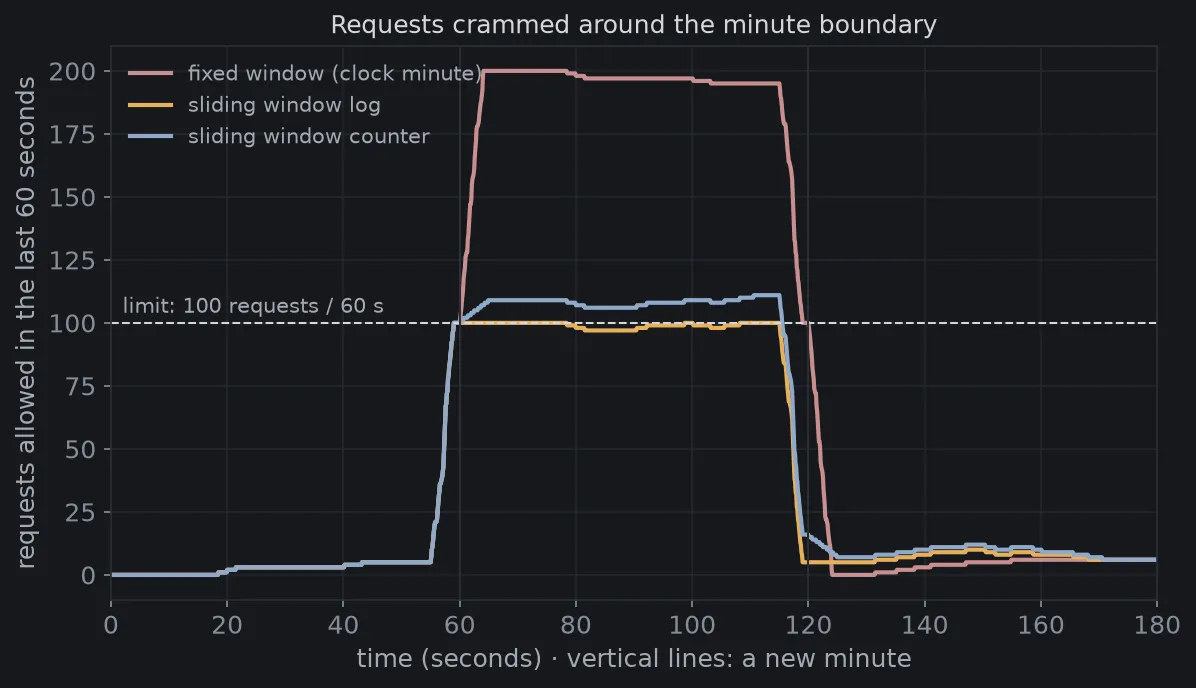
The “max in any 60 s” column is computed with a sliding window too: worst_60s uses the same two-pointer technique as problem 2, only on a timeline. Counting per clock minute lets 200 requests through within 60 seconds, exactly twice the limit. The sliding window log never goes above 100.
The sliding window counter reaches 111, far more than Cloudflare’s 0.003%. The two results do not contradict each other. The two-number estimate assumes the previous minute’s requests were spread evenly across that minute, and this scenario breaks the assumption on purpose by cramming everything into the last 5 seconds. With real traffic from millions of people, requests are spread much more evenly, so the estimate is almost always right. That is why an OTP endpoint, where an attacker deliberately bunches requests, should use the exact method.
Try changing the scenario in requests, for example spreading 240 requests evenly over 2 minutes, to see the three lines almost coincide.
One idea, many layers
The sliding window teaches a habit worth having: when the same question repeats on data that is almost identical to last time, do not start over, update only what changed. On a list of numbers, it turns into . On a timeline, it turns a rule with a hole into a rule that holds for every 60-second span.
The system design side adds another lesson: the most accurate algorithm is not always the right choice. Cloudflare picked a two-number estimate because at its scale, memory and commands per request matter more than an error of a few thousandths of a percent. An OTP endpoint is the opposite. Knowing what you are trading for what is the hard part.
Next time your phone says “try again in 1 minute”, you will know there is a 60-second window sliding behind it, and your code just touched its edge.
Tài liệu tham khảo
- [1]M. Nottingham and R. Fielding. RFC 6585: Additional HTTP Status Codes (section 4: 429 Too Many Requests). IETF, 2012.
- [2]How we built rate limiting capable of scaling to millions of domains. Cloudflare Blog, 2017.
- [3]Paul Tarjan. Scaling your API with rate limiters. Stripe Blog, 2017.
- [4]Redis Sorted Sets. Redis Documentation.
- [5]LeetCode 3: Longest Substring Without Repeating Characters. LeetCode.