CPU vs GPU: what is the difference? Why AI needs GPUs
A CPU has a few strong cores, a GPU thousands of small ones. How the two chips differ, why gaming cards became AI engines, and when the CPU still wins.
Mục lục
Ten years ago, a GPU was something gamers bought to make their games run smoother. Today the very same kind of chip powers ChatGPT and self-driving cars, and it has at times made Nvidia, the company that builds GPUs, the most valuable company in the world. Meanwhile, every computer still needs a CPU. So how do CPUs and GPUs differ? Which one is more powerful?
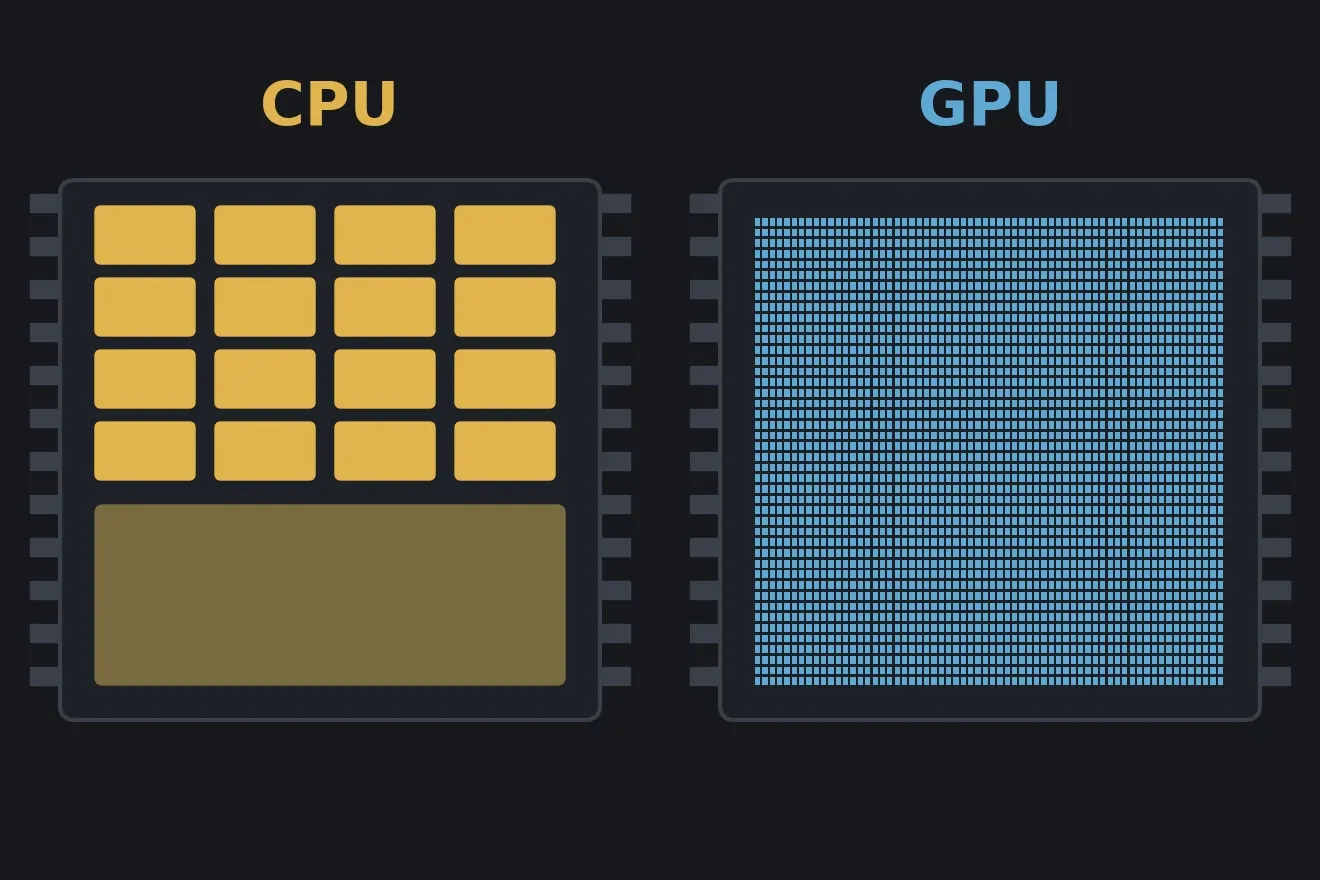
The short answer: neither is more powerful; they are powerful at different kinds of work. A CPU (central processing unit) has a few very strong cores, good at messy, branch-heavy tasks that must finish fast, one at a time. A GPU (graphics processing unit) has thousands of small, simple cores, good at doing the same calculation on millions of numbers at once.
This article explains the difference with everyday examples first, then the real numbers of two specific chips, why AI is “hooked” on GPUs, when the CPU still wins, and finally a short piece of code so you can check the numbers yourself.
CPU vs GPU: one comparison
Imagine you have to grade one million multiple-choice tests.
- The CPU option: hire 16 professors. Each is brilliant, reads fast, and can handle answer sheets with wrong marks, crossed-out answers and notes scribbled in the margin. But there are only 16 of them.
- The GPU option: hire 16,000 students. Each one knows exactly one thing: compare the sheet with the answer key and add up the score. Anything unusual confuses them. But there are 16,000 of them, and in multiple-choice grading every test looks like every other test.
For a million multiple-choice tests, the students win by a landslide. But if the job is writing an analytical report, where each paragraph depends on the previous one, 16,000 students cannot help: only one person can write at a time, and that person should be a professor.
That is the core difference:
- A CPU is designed to reduce latency: get one task done as early as possible.
- A GPU is designed to increase throughput: get as many similar tasks as possible done per second, even if each one takes longer.
Real numbers: Ryzen 9 9950X and RTX 4090
Take two popular high-end desktop chips as examples: the AMD Ryzen 9 9950X CPU (released 2024) and the Nvidia GeForce RTX 4090 GPU (released 2022)[1][2].
| CPU Ryzen 9 9950X | GPU RTX 4090 | |
|---|---|---|
| Cores | 16 cores (32 threads) | 16,384 CUDA cores |
| Maximum clock | 5.7 GHz | about 2.5 GHz |
| Memory | the computer’s DDR5 RAM, up to hundreds of GB | 24 GB GDDR6X right on the card |
| Memory bandwidth | about 90 GB/s (DDR5-5600, dual channel) | about 1,000 GB/s |
| Rated power | 170 W | 450 W |
Three things worth noticing:
- The GPU has about 1,000 times more cores, but each one runs slower and is far simpler. The clock speed (GHz) is like the tapping rhythm of a grader: 5.7 GHz means a CPU core “taps” 5.7 billion times per second, doing one small step per tap; a GPU core taps only about 2.5 billion times.
- The GPU’s memory is smaller but about 11 times faster. Memory bandwidth is like the number of lanes on the road between a warehouse and a workshop: it is not how fast each truck drives, but how much cargo arrives per second. The CPU’s road is a two-lane highway; the GPU’s is a twenty-lane motorway, but its warehouse is smaller. For AI this is often the most important number, and we will come back to it.
- The GPU draws several times more power. Thousands of cores running together are paid for in electricity and heat; the article AI’s thirst for electricity (in Vietnamese) tells that story at data-centre scale.
Inside the chip: where does the area go?
Both chips are built from tens of billions of transistors, tiny on/off switches (for transistors and what “3 nm” really means, see what is a 3 nm chip?). So why does one end up with 16 cores and the other with 16,000? Because they spend their chip area on different things.
The CPU spends its area on making each core smart[4]:
- Large caches. Like a professor keeping the most-used books right on the desk instead of walking down to the library (RAM) every time. Grabbing a book from the desk takes a second; the library takes a few minutes. Same for a CPU core: reading from cache is tens to hundreds of times faster than reading from RAM.
- Branch prediction. When a program reaches an “if… then…”, the CPU does not wait to find out the answer; it guesses which branch will run and starts on it right away. Like a barista who sees a regular walk in and starts making their usual latte: guess right and the customer doesn’t wait; guess wrong and the drink goes down the sink, costing only a little effort. Modern CPUs guess right the vast majority of the time.
- Out-of-order execution. Whichever instruction has its ingredients ready goes first, instead of queuing behind the one in front of it. Like a cook who chops the vegetables while waiting for the broth to boil, rather than staring at the pot.
All of these parts serve one goal: making a single stream of instructions, full of branches, finish as fast as possible. That is the kind of work done by operating systems, browsers, spreadsheets and web servers.
The GPU spends its area on sheer numbers of arithmetic units, and it deals with waiting for memory through a different trick: keep a huge amount of unfinished work in flight. When one group of threads has to wait for data from memory, the GPU instantly switches to another group that is ready. Like a waiter in a busy restaurant: while one table waits for the kitchen, take the order at another table instead of standing next to the first one until the food arrives. Instead of trying never to wait (the CPU’s way), the GPU accepts waiting but always has something else to do in the meantime.
Why were GPUs built for graphics?
A 4K screen has million pixels. Playing a game at 60 frames per second means computing the colour of about 500 million pixels every second. Each pixel’s colour comes from the same formula (where the light falls, how the surface reflects it), just at a different position. And no pixel has to wait for another.
That is the perfect “multiple-choice grading” problem: a huge number of identical, independent tasks. From the late 1990s, graphics card makers built chips for exactly that kind of work, and Nvidia started using the name “GPU” in 1999.
Why does AI need GPUs?
A neural network, stripped of jargon, does almost one thing over and over: matrix multiplication. It sounds scary, but you have done it when checking a grocery receipt: each line is quantity times unit price, then you add everything up. Matrix multiplication is doing that for millions of receipts at once, and no receipt has to wait for another. Multiple-choice grading again.
The history moved fast:
- 2007: Nvidia released CUDA, letting programmers use GPUs to compute things other than graphics.
- 2009: Andrew Ng’s group at Stanford showed that training neural networks on GPUs could be up to about 70 times faster than on CPUs[5].
- 2012: AlexNet, trained on two GTX 580 gaming cards, won the ImageNet image recognition contest by a wide margin[6]. Deep learning took off, and GPUs became the default tool.
- 2017: Nvidia added Tensor Cores to the V100 GPU, circuits that multiply small matrices in a single step, far faster than ordinary CUDA cores[8]. Instead of punching each multiplication into a calculator, imagine a stamp that prints an entire multiplication table in one press. Since then, data-centre GPUs have looked more and more like “AI chips” rather than “graphics chips”.
Memory bandwidth: the real bottleneck of chatbots
Here is a detail few people notice: when a language model (like a chatbot) generates text word by word, the slowest part is usually not the arithmetic but reading the weights from memory. For every token generated, the machine must read all of the model’s weights once. Picture someone who, to write each next word, has to leaf through a thick book from cover to cover: how fast they write depends not on their hand, but on how fast they turn pages.
Take a 7-billion-parameter model compressed to 4 bits per parameter: about 3.5 GB. Divide bandwidth by size and you get a theoretical speed ceiling:
- A CPU with dual-channel DDR5 RAM (about 90 GB/s): at most about 26 tokens per second.
- An RTX 4090 (about 1,000 GB/s): at most about 288 tokens per second.
These are ceilings on paper, and real numbers are lower, but that 10-fold gap is why people running AI on their own computers always ask “how many GB of VRAM does the card have?”. The model has to fit in the GPU’s memory to enjoy that bandwidth: the whole book must be on the desk, otherwise every missing page means a trip to the warehouse. It is also why data-centre GPUs use HBM memory stacked right next to the chip, like building the warehouse wall-to-wall with the workshop: expensive, but faster still.
When does the CPU still win?
GPUs do not make everything faster. There are at least three cases where the CPU clearly wins:
1. Work with a lot of serial parts. In 1967, IBM engineer Gene Amdahl pointed out a simple but harsh limit[7]: if part of a job must be done serially, then no matter how many cores you add, the speed-up cannot exceed a ceiling. If 10% of the work is serial, you can never get more than 10 times faster, whether you have 16 cores or 16,000. Like cooking a holiday dinner: hire 100 helpers and the vegetables are chopped in a flash, but the turkey still needs its hours in the oven, and dinner cannot be ready before the turkey. Figure 1 below shows this.
2. Branch-heavy work. Remember “a table of 32 students must make the same move”. If half the table needs the “if” branch and the other half the “else” branch, the GPU has to run both branches one after the other, with half the table sitting idle each time. The more tangled the branching, the more the GPU wastes.
3. Small jobs. Data must be copied from RAM to the GPU’s memory over the PCIe slot (about 32 GB/s for PCIe 4.0 x16), much slower than the memory on either side. For a small job, copying back and forth takes longer than the computation itself. Like hiring 16,000 students to grade 20 tests: handing out the papers alone takes all morning.
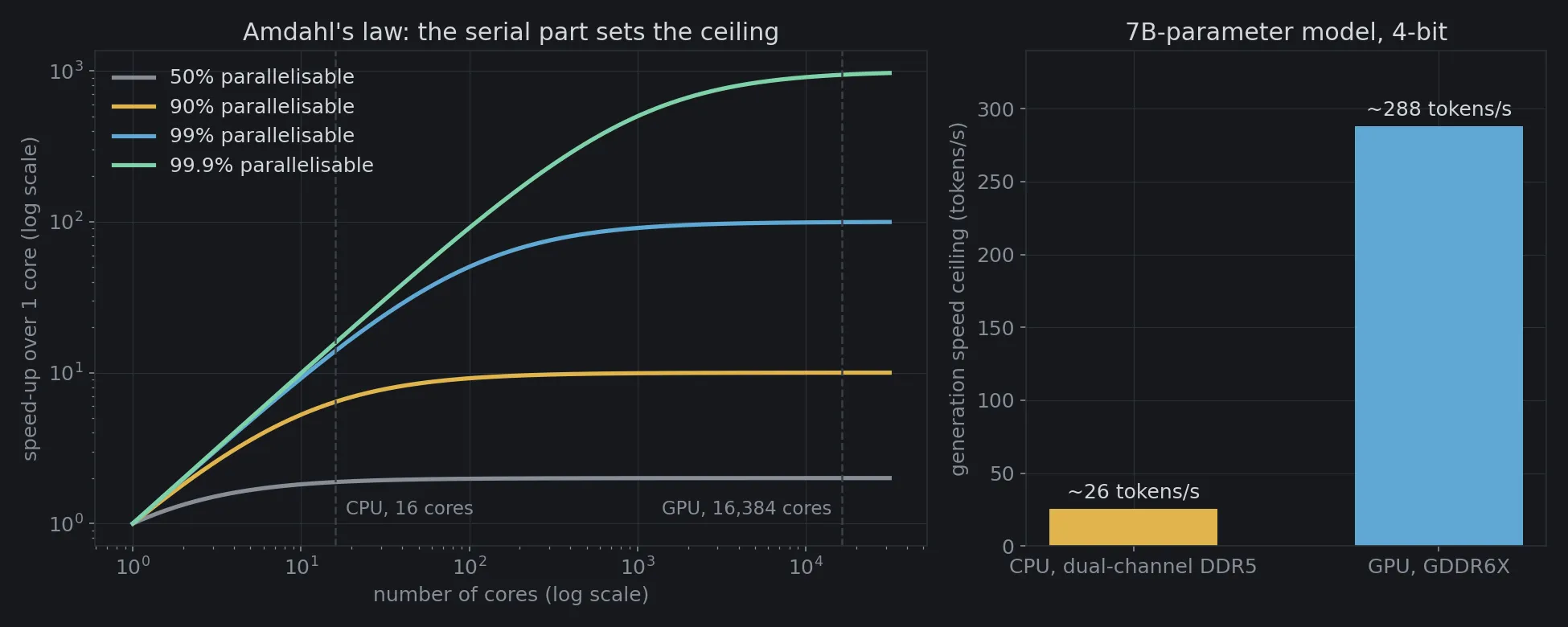
Read the left chart along the dashed line at “GPU, 16,384 cores”:
| Parallel fraction | 16 cores vs 1 core | 16,384 cores vs 1 core |
|---|---|---|
| 50% | 1.9 times | 2.0 times |
| 90% | 6.4 times | 10.0 times |
| 99% | 13.9 times | 99.4 times |
| 99.9% | 15.8 times | 942 times |
When only half the work can run in parallel, 16,000 cores are almost useless compared with 16. Only when the work is over 99% parallel, like matrix multiplication or shading pixels, do thousands of cores really pay off. That is the border between CPU territory and GPU territory.
So what does your computer need?
Almost every computer has both, because they work together: the CPU coordinates, runs the operating system and the program logic, then hands large, regular blocks of work to the GPU.
- Office work, studying, browsing: the CPU matters more. The GPU built into the processor is enough.
- Gaming, video editing, 3D graphics: a dedicated GPU is worth the money, since this is exactly what it was born to do.
- Running AI on your own machine: look at GPU memory (VRAM) first, speed second.
- Recent laptops and phones: the line is blurring. Apple’s M-series chips and phone chips put the CPU, the GPU and a dedicated AI unit (NPU) on one chip sharing the same memory, so there is no more copying data back and forth: instead of two kitchens carrying dishes over to each other, everyone eats from the same table. The NPU is like a worker who knows exactly one job (small matrix multiplications) but does it very fast on very little power, ideal for a battery-powered phone.
At data-centre scale, the race is moving on to AI chips even more specialised than GPUs, and to entirely different directions such as computing with light (in Vietnamese).
Compute it yourself: Amdahl’s law and the generation speed ceiling
The code below produces exactly Figure 1 and prints the table above. The first part computes the speed-up from Amdahl’s law:
where is the fraction of work that can run in parallel and is the number of cores. As grows towards infinity, approaches : that is the ceiling. The second part divides memory bandwidth by model size to get the generation speed ceiling. There is no randomness; you only need numpy and matplotlib.
import matplotlib.pyplot as pltimport numpy as np
plt.rcParams.update({"figure.facecolor": "#16181c", "axes.facecolor": "#16181c", "text.color": "#d4d7dc",                     "axes.edgecolor": "#2a2e35", "axes.labelcolor": "#878d97",                     "xtick.color": "#878d97", "ytick.color": "#878d97", "font.size": 12})COLORS = {0.5: "#878d97", 0.9: "#e0b44c", 0.99: "#5fa8d3", 0.999: "#7fd1a8"}
def amdahl(p, n):    """Amdahl's law: the parallel fraction p is shared by n cores, the remaining 1 − p still runs serially."""    return 1 / ((1 - p) + p / n)
# 1. Speed-up versus number of cores, for four different parallel fractions.cores = np.logspace(0, 4.5, 400)CPU, GPU = 16, 16_384        # 16 cores like a Ryzen 9 9950X; 16,384 CUDA cores like an RTX 4090for p in COLORS:    print(f"p = {p:5}: 16 cores {amdahl(p, CPU):6.1f}x faster, 16,384 cores {amdahl(p, GPU):6.1f}x faster,"          f" ceiling {1 / (1 - p):6.0f}x")
# 2. Upper bound on the generation speed of a 7-billion-parameter language model at 4 bits (~3.5 GB):#    every token requires reading all the weights from memory once.model_gb = 7e9 * 0.5 / 1e9bandwidth = {"CPU, dual-channel DDR5": 89.6, "GPU, GDDR6X": 1008}   # GB/sfor name, bw in bandwidth.items():    print(f"{name}: at most ~{bw / model_gb:.0f} tokens/s")
fig, (a1, a2) = plt.subplots(1, 2, figsize=(13, 5.2), gridspec_kw={"width_ratios": [1.6, 1]})for p, color in COLORS.items():    a1.loglog(cores, amdahl(p, cores), color=color, lw=2.5, label=f"{p * 100:g}% parallelisable")for n, name, align in [(CPU, "CPU, 16 cores", "left"), (GPU, "GPU, 16,384 cores", "right")]:    a1.axvline(n, color="#3a3f48", ls="--", lw=1.2)    a1.text(n * (1.15 if align == "left" else 0.87), 1.15, name, color="#878d97", fontsize=11, ha=align)a1.set(xlabel="number of cores (log scale)", ylabel="speed-up over 1 core (log scale)",       title="Amdahl's law: the serial part sets the ceiling")a1.legend(frameon=False, loc="upper left")
names, bw = zip(*bandwidth.items())bars = a2.bar(names, [b / model_gb for b in bw], color=["#e0b44c", "#5fa8d3"], width=0.55)a2.bar_label(bars, labels=[f"~{b / model_gb:.0f} tokens/s" for b in bw], color="#d4d7dc", padding=4)a2.set(ylabel="generation speed ceiling (tokens/s)", title="7B-parameter model, 4-bit", ylim=(0, 340))for a in (a1, a2):    a.set_axisbelow(True)    a.grid(color="#2a2e35", lw=0.6)fig.tight_layout()fig.savefig("cpu-va-gpu-khac-nhau-en.png", dpi=150)
The output:
p = 0.5: 16 cores 1.9x faster, 16,384 cores 2.0x faster, ceiling 2xp = 0.9: 16 cores 6.4x faster, 16,384 cores 10.0x faster, ceiling 10xp = 0.99: 16 cores 13.9x faster, 16,384 cores 99.4x faster, ceiling 100xp = 0.999: 16 cores 15.8x faster, 16,384 cores 942.5x faster, ceiling 1000xCPU, dual-channel DDR5: at most ~26 tokens/sGPU, GDDR6X: at most ~288 tokens/sThis model is deliberately simple: it treats every core as equally strong, while in reality a CPU core is far stronger than a CUDA core. Try changing it: make a GPU core only as strong as a CPU core (divide the GPU’s by 20) and see where the border “from what parallel fraction is the GPU worth it” moves.
Professors and students
CPUs and GPUs are not a strong and a weak version of the same thing. They are two answers to two different questions. The CPU answers: “how do I finish one hard task as early as possible?”. The GPU answers: “how do I finish as many easy tasks as possible in a second?”.
Today’s AI runs on GPUs not because GPUs are “smarter”, but because the heaviest part of artificial intelligence turned out to be the easiest kind of work: multiply and add, trillions of times, every time the same. The hard part, coordinating everything, is still the job of the professor sitting next door.
Free geometry illustrations for students and teachers: EyeViz.
Tài liệu tham khảo
- [1]NVIDIA Ada GPU Architecture (whitepaper). NVIDIA, 2022.
- [2]AMD Ryzen 9 9950X Desktop Processor. AMD, 2024.
- [3]CUDA C++ Programming Guide. NVIDIA.
- [4]John L. Hennessy and David A. Patterson. Computer Architecture: A Quantitative Approach (6th ed.). Morgan Kaufmann, 2017.
- [5]Rajat Raina, Anand Madhavan and Andrew Y. Ng. Large-scale deep unsupervised learning using graphics processors. ICML, 2009.
- [6]Alex Krizhevsky, Ilya Sutskever and Geoffrey E. Hinton. ImageNet Classification with Deep Convolutional Neural Networks. NeurIPS, 2012.
- [7]Gene M. Amdahl. Validity of the single processor approach to achieving large scale computing capabilities. AFIPS Spring Joint Computer Conference, 1967.
- [8]NVIDIA Tesla V100 GPU Architecture (whitepaper). NVIDIA, 2017.