Kafka vs RabbitMQ: a post office and a logbook
RabbitMQ hands each message to one recipient and deletes it; Kafka writes everything into a logbook anyone can reread. Two different ideas of a message, and when to pick which.
Mục lục
You place an order at midnight. In the few seconds after you tap “Place order”, a lot has to happen: the warehouse must reserve the item, a confirmation email must go out, loyalty points must be added, the fraud team must check the order, and the sales dashboard must tick up. If the website had to do every one of those jobs before telling you “order placed”, you would stare at a spinning wheel for a long time, and one hiccup in the email service would break the whole order.
Large systems solve this differently. The website just leaves a note, “new order, number 1234”, and answers you straight away. The other services pick up the note and do their own part, as fast or as slowly as they can. The thing that holds those notes is called a message broker: a go-between for messages. The two names you will meet most often are RabbitMQ and Kafka.
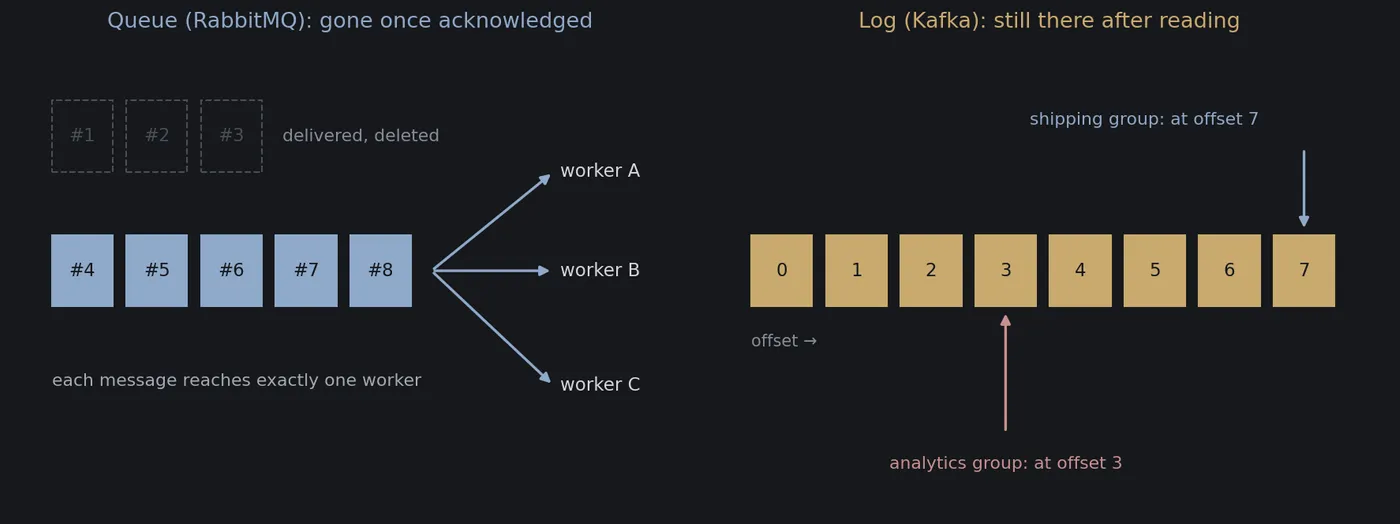
People often compare the two as if they were two models of the same car and the question were which is faster. In fact they are two different ways of thinking. RabbitMQ is like a post office: it takes a letter, sorts it, hands it to exactly the right person, and once that person signs for it, the letter is no longer at the post office. Kafka is like a logbook: everything that happens is written at the end of the book, nobody tears out a page when they read it, and anyone who wants to read turns to their own page. This article explains those two ideas, the practical differences they lead to, and when to choose which. At the end there is a small piece of code that simulates both.
Why have a go-between at all?
Without a go-between, the order service has to call every other service directly, like one person phoning the warehouse, the accountant and the courier in turn. That has three problems:
- It is slow. The customer waits for the slowest job before getting an answer.
- Failures cascade. When one service is down, the service calling it reports an error too.
- It is hard to grow. Every time a new service needs to know about orders, someone has to change the order service to call one more place.
Putting a go-between in the middle solves all three. The sender (the producer) only has to hand the message to the broker. The receiver (the consumer) picks messages up when it has time. At peak times, such as a big sale day, messages pile up in the broker like customers queuing at a counter: nobody is turned away, and the services behind it work through them steadily. If a service goes down for a while, its messages wait, and it carries on when it comes back.
RabbitMQ and Kafka can both do this. The difference lies in how long a message lives and who gets to read it.
RabbitMQ: a post office that delivers by hand
RabbitMQ appeared in 2007. It is written in Erlang and follows an open messaging standard called AMQP. Its model has three main characters [4]:
- Exchange (the sorting room). A producer does not send straight to a queue; it sends to an exchange, together with a routing key (like the address on an envelope, for example
orders.hanoi). - Queue (each recipient’s mailbox). The exchange reads the address and drops the letter into the right box. There are several sorting styles: deliver to the exact address (
direct), deliver by pattern such as “every order in Hanoi” (topic), or copy the letter into every box (fanout). - Consumer (the recipient). RabbitMQ pushes letters to consumers, never more than a preset number at a time so that nobody is swamped.
The key idea is signing for delivery, the acknowledgement or ack [5]. When a consumer has finished with a message it sends an ack, like signing the slip for a parcel. At that point RabbitMQ deletes the message from the queue. If a consumer crashes before signing, RabbitMQ gives the message to someone else. No message is lost, and each message goes to exactly one consumer of that mailbox.
That makes RabbitMQ a good fit for “here is a job, whoever is free, do it”: send an email, shrink an uploaded photo, generate a PDF invoice. Need more speed? Add more consumers to the same mailbox. Ten people taking jobs from one queue are almost ten times as fast, like opening more checkouts at a supermarket.
The price: a delivered letter is gone. A service added today cannot reread yesterday’s orders, because the post office keeps no copies. And RabbitMQ is designed for short queues: letters arrive and go straight out. If millions of messages pile up because nobody takes them, something is wrong with the system; that is not the normal way to use it.
Kafka: a logbook that never loses a page
Kafka was born at LinkedIn around 2010, built by Jay Kreps, Neha Narkhede and Jun Rao, and open-sourced in 2011 [1]. LinkedIn’s problem then was not “who should do this job”, but collecting a huge volume of events (every page view, every click, every search) and passing them to many different systems at once, from recommendations to the analytics warehouse. Jay Kreps has said he named it after the writer Franz Kafka because it is a system optimised for writing, and he liked Kafka’s work.
The central idea of Kafka is the log [2]: a list you can only append to at the end, never edit or insert into. Every entry has a sequence number called its offset, like a page number in the book. The other concepts revolve around that book [3]:
- A topic is one logbook per subject, such as “orders” or “page views”.
- A partition. A book that is too thick cannot be written fast enough by one person, so Kafka splits a topic into several smaller books written in parallel, like a registration desk with six books for six lines of people. Messages with the same key (for example the same customer ID) always go into the same book, so the order of one customer’s events is preserved. Across different books there is no overall order.
- A consumer group. Each group is one application, such as “shipping” or “analytics”. Kafka does not delete messages when someone reads them. Each group keeps its own bookmark: “I have read up to offset 7”. Shipping reads fast, analytics reads slowly, and neither affects the other.
- Retention. The book cannot grow forever. By default Kafka keeps messages for 7 days and then deletes the old part, whether anyone has read it or not. This can be set to a few hours, a few months, or forever.
The other difference from the post office is who takes the initiative. A Kafka consumer pulls: it asks “give me the messages from offset 7 onwards”. Because the bookmark is in the reader’s hands, the reader can move it back to reread yesterday, last week, or the whole book from the beginning.
A classic RabbitMQ queue cannot do this, and it is why Kafka shines at things like:
- Adding a new service without anyone resending data. The fraud team finishes its service today and points it at the start of the log, so it can learn from all of last week’s orders.
- Fixing a bug and running again. The analytics service miscounted for two days because of a bug. Fix the code, move the bookmark back two days, recompute.
- Many applications reading one stream of events, each at its own pace, while the data is written only once.
The price of the logbook: partitions are the ceiling
Kafka keeps order with a simple rule: within a group, each partition is assigned to exactly one reader. If two people read the same book, neither knows which entries the other has handled, and the order breaks.
As a result, the number of partitions becomes the ceiling on parallel processing. A topic with 6 partitions lets a group have at most 6 people working at once; the seventh and later ones sit idle. RabbitMQ has no such ceiling: adding people to the same queue adds capacity.
The simulation at the end of the article shows this clearly. With 60,000 orders, each taking 10 milliseconds on average (one worker handles about 100 orders a second):
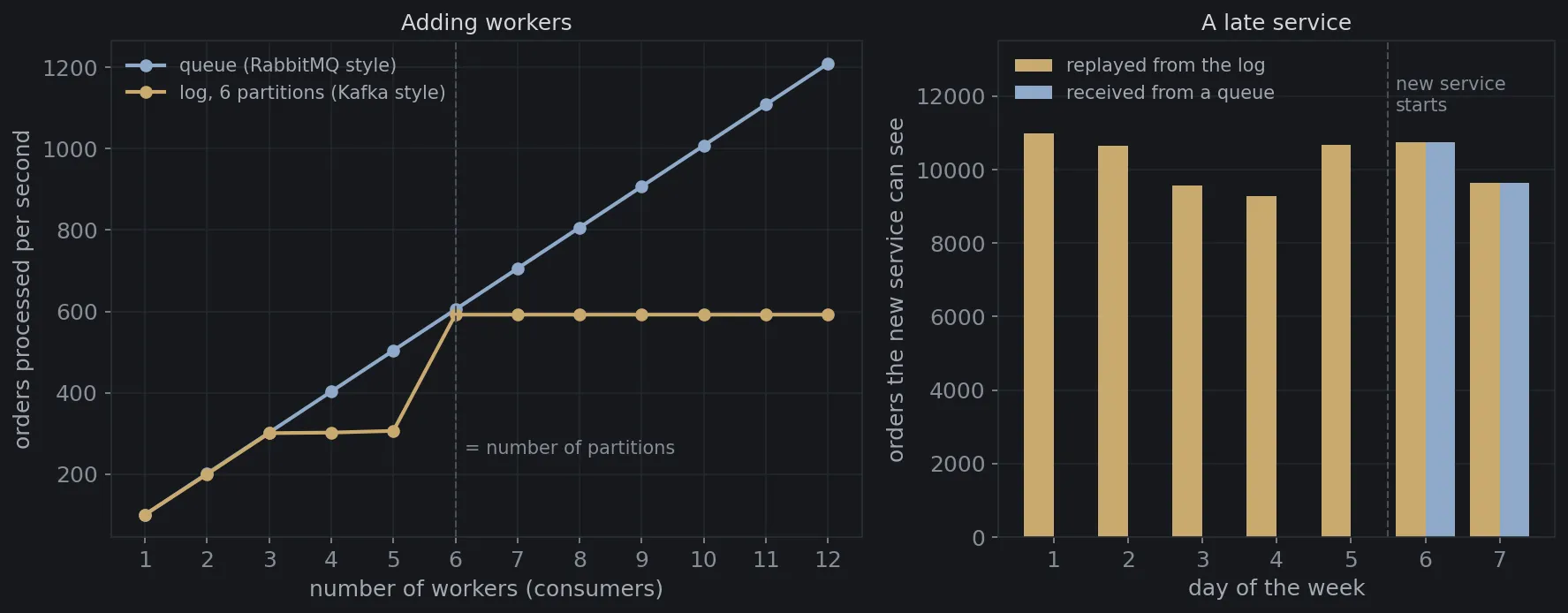
- Queue: 1 worker handles 101 orders a second, 6 workers 605, 12 workers 1,209. It grows evenly with the number of workers.
- Log with 6 partitions: it rises to 301 orders a second with 3 workers, then stalls at about 300 with 4 and 5 workers, jumps to 592 with 6, and stays flat from there to 12.
The stall at 4 and 5 workers is the interesting detail. Six partitions shared among four people means two people each get two books, and the whole group is only as fast as its slowest member. Only at 6 people, one book each, does that go away. The figure 592 rather than 600 has a reason too: customers are assigned to the six books by customer ID, so the books are not equally thick, and the thickest one decides the time.
The practical lesson: choosing the number of partitions is an important design decision with Kafka. Leave room for the future, because adding partitions later reshuffles which customer lands in which book. This is the same problem of spreading data over many machines that consistent hashing solves elsewhere.
The right-hand side of the figure shows the logbook’s strength. A fraud-detection service starts at the beginning of day 6. Reading from the log, it sees all 71,597 orders of the week. Subscribed to a queue, it sees only 20,407 orders from the last two days, because the letters of the first five days were delivered and deleted long ago.
Quick comparison
| RabbitMQ | Kafka | |
|---|---|---|
| Picture | A post office that delivers by hand | An append-only logbook |
| Messages after processing | Deleted when the recipient acknowledges | Kept until retention runs out (7 days by default) |
| Who takes the initiative | The broker pushes to consumers | Consumers pull and keep their own bookmark |
| Rereading old data | No (classic queues) | Yes, move the offset back |
| Many applications reading | Each application needs its own queue, each with its own copy | Written once, read by any number of groups |
| Adding workers | Add them to the queue and it gets faster | Up to the number of partitions |
| Order | Queue order, but with several workers, jobs finish out of order | Strict order within each partition |
| Routing | Very flexible: by address, by pattern, to everyone | Simple: pick a topic and a key |
| Best for | Handing out jobs, background tasks, request–reply | Event streams, logs, analytics, syncing data between systems |
Which should you choose?
One question tells them apart quickly: is your message a job to be done, or an event that has happened?
“A job to be done” is something like “email customer 1234”, “shrink this photo”, “issue the invoice for order 5678”. Each job needs exactly one worker; once it is done, it is done, and nobody needs to read it again. That is RabbitMQ territory. On top of that, if you need complex routing (Hanoi orders to the Hanoi warehouse, orders over a certain amount also to the review team), priorities between messages, or delayed retries of a failed job, RabbitMQ has those tools built in. It is also light, easy to install and easy to understand for a small team.
“An event that has happened” is something like “customer 1234 placed an order”, “a user viewed this page”, “the account balance changed”. An event is a fact. Nobody “finishes” a fact, and many different parties want to know about it: the warehouse, accounting, analytics, product recommendations, and services that will only be written next year. That is Kafka territory. Kafka is also the usual choice when the volume of data is very large, because appending to the end of a file is the fastest way to write to disk, and because a message is written once for every reader.
Some common misconceptions:
- “Kafka is faster than RabbitMQ.” That is not the whole story. Kafka is optimised to carry a lot (very high total throughput) by batching messages. RabbitMQ is optimised to deliver quickly, one message at a time, while queues are short. The right question is whether you need to carry a lot or to deliver quickly, and for most small and medium systems, either one has capacity to spare.
- “Kafka guarantees order.” Only within each partition. If order matters, choose the key so that events that must stay in order (for example those of the same account) always land in the same partition.
- “With a broker I don’t have to worry about duplicates.” Both can deliver a message more than once: a consumer finishes its work but crashes before it acknowledges or saves its bookmark, and when it restarts it receives the message again. The processing side still has to tolerate duplicates, exactly the problem of idempotency in payments. Kafka also has transactions that reduce duplicates in some processing pipelines, but that is no reason to skip this step.
The line between the two is also blurring. Since version 3.9 (2021), RabbitMQ has a stream type: an append-only log, read without deleting, rereadable from any position, very much like Kafka [6]. And Kafka 4.0 (2025) introduced an early-access version of queue-style sharing, which lets several consumers take jobs from the same partition. Each side is borrowing the other’s strengths. But the underlying ideas are still different, and understanding them helps you choose better than memorising feature tables.
In practice, many companies use both: Kafka as the “river of events” flowing through the whole company, and RabbitMQ (or a similar queue) for “handing out work” inside each system.
Try it yourself: a queue and a log
The Python code below builds two small models: a RabbitMQ-style queue (taking a message removes it; whoever is free takes the next job) and a Kafka-style log (6 partitions, customers assigned to partitions by customer ID, each group remembering its own offset). It runs two experiments: processing 60,000 orders with 1 to 12 workers, and a service that starts on day 6 and wants to see the whole week of orders. It draws figure 1 and the cover diagram. You only need matplotlib. It is a model for understanding the ideas, not a benchmark of the real software.
import heapqimport randomimport zlibfrom collections import deque
import matplotlib.pyplot as plt
plt.rcParams.update({"figure.facecolor": "#16181c", "axes.facecolor": "#16181c", "text.color": "#d4d7dc",                     "axes.edgecolor": "#2a2e35", "xtick.color": "#878d97", "ytick.color": "#878d97", "font.size": 12})random.seed(2026)
PARTITIONS = 6          # the Kafka "orders" topic is split into 6 partitionsN_ORDERS = 60_000       # number of orders to processSERVICE_MS = 10         # each order takes 10 ms on average to process

class Queue:    """RabbitMQ style: a message taken off the queue is gone; whoever is free takes the next one."""
    def __init__(self):        self.items = deque()
    def publish(self, msg):        self.items.append(msg)
    def get(self):        return self.items.popleft() if self.items else None   # acknowledged means deleted

class Log:    """Kafka style: an append-only log, nothing is deleted on read; each group remembers where it is."""
    def __init__(self, partitions):        self.parts = [[] for _ in range(partitions)]        self.offsets = {}        # (group, partition) → next position to read
    def publish(self, key, msg):        self.parts[zlib.crc32(key.encode()) % len(self.parts)].append(msg)   # same key → same partition → order kept
    def read(self, group, p):        i = self.offsets.get((group, p), 0)        if i >= len(self.parts[p]):            return None        self.offsets[(group, p)] = i + 1        return self.parts[p][i]

orders = [(f"customer-{random.randrange(5_000)}", random.expovariate(1 / SERVICE_MS)) for _ in range(N_ORDERS)]

def queue_time(n_workers):    q = Queue()    for _, cost in orders:        q.publish(cost)    free_at = [0.0] * n_workers              # when each worker becomes free    heapq.heapify(free_at)    while (cost := q.get()) is not None:        t = heapq.heappop(free_at)           # the first free worker takes the next order        heapq.heappush(free_at, t + cost)    return max(free_at)

def log_time(n_workers):    log = Log(PARTITIONS)    for key, cost in orders:        log.publish(key, cost)    busy = [0.0] * n_workers    for p in range(PARTITIONS):              # each partition goes to exactly ONE worker in the group        w = p % n_workers        while (cost := log.read("order-processing", p)) is not None:            busy[w] += cost    return max(busy)

workers = list(range(1, 13))rate_q = [N_ORDERS / queue_time(n) * 1000 for n in workers]   # orders per secondrate_l = [N_ORDERS / log_time(n) * 1000 for n in workers]for n, a, b in zip(workers, rate_q, rate_l):    print(f"{n:>2} workers   queue: {a:>5.0f} orders/s   log with {PARTITIONS} partitions: {b:>5.0f} orders/s")
# A new (fraud detection) service starts at the beginning of day 6 and wants the whole week of orders.per_day = [random.randint(9_000, 11_000) for _ in range(7)]start_day = 5week = Log(1)for d, n in enumerate(per_day):    for _ in range(n):        week.publish("x", d)seen_log = 0while week.read("fraud-detection", 0) is not None:    # the new group reads from the start of the log (offset 0)    seen_log += 1seen_queue = sum(per_day[start_day:])                # queue: only orders arriving AFTER the service subscribedprint(f"orders this week: {sum(per_day)}   seen by the new service via the log: {seen_log}   via a queue: {seen_queue}")
# Figure 1: how much faster with more workers? / how many orders does a late service see?fig, (ax1, ax2) = plt.subplots(1, 2, figsize=(12, 4.8), gridspec_kw={"width_ratios": [1.35, 1]})ax1.plot(workers, rate_q, "o-", color="#8fa9c9", lw=2, label="queue (RabbitMQ style)")ax1.plot(workers, rate_l, "o-", color="#c9a96e", lw=2, label=f"log, {PARTITIONS} partitions (Kafka style)")ax1.axvline(PARTITIONS, color="#4a4e57", ls="--", lw=1)ax1.text(PARTITIONS + 0.15, 250, "= number of partitions", color="#878d97", fontsize=10)ax1.set_xlabel("number of workers (consumers)", color="#a4a9b2")ax1.set_ylabel("orders processed per second", color="#a4a9b2")ax1.set_title("Adding workers", color="#d4d7dc", fontsize=12)ax1.set_xticks(workers)ax1.legend(frameon=False, labelcolor="#a4a9b2", fontsize=10, loc="upper left")ax1.grid(color="#22262c")ax1.set_axisbelow(True)
days = list(range(1, 8))ax2.bar([d - 0.2 for d in days], per_day, width=0.4, color=["#c9a96e"] * 7, label="replayed from the log")ax2.bar([d + 0.2 for d in days], [n if d - 1 >= start_day else 0 for d, n in zip(days, per_day)], width=0.4,        color="#8fa9c9", label="received from a queue")ax2.axvline(start_day + 0.5, color="#4a4e57", ls="--", lw=1)ax2.text(start_day + 0.6, 11_600, "new service\nstarts", color="#878d97", fontsize=10, ha="left")ax2.set_ylim(0, 13_500)ax2.set_xticks(days)ax2.set_xlabel("day of the week", color="#a4a9b2")ax2.set_ylabel("orders the new service can see", color="#a4a9b2")ax2.set_title("A late service", color="#d4d7dc", fontsize=12)ax2.legend(frameon=False, labelcolor="#a4a9b2", fontsize=10, loc="upper left")ax2.grid(axis="y", color="#22262c")ax2.set_axisbelow(True)fig.tight_layout()fig.savefig("hai-mo-phong-en.png", dpi=150, bbox_inches="tight")
# Figure 2 (cover image): a queue deletes what it delivered; a log keeps it, each group has its own bookmark.fig, (a, b) = plt.subplots(1, 2, figsize=(12, 4.6))for ax in (a, b):    ax.set_xlim(0, 10)    ax.set_ylim(0, 6)    ax.axis("off")a.set_title("Queue (RabbitMQ): gone once acknowledged", color="#8fa9c9", fontsize=13)for i in range(5):    a.add_patch(plt.Rectangle((0.6 + i * 1.1, 2.6), 0.9, 0.9, color="#8fa9c9"))    a.text(1.05 + i * 1.1, 3.05, f"#{i + 4}", ha="center", va="center", color="#16181c", fontsize=11)for i in range(3):    a.add_patch(plt.Rectangle((0.6 + i * 1.1, 4.3), 0.9, 0.9, fill=False, ec="#4a4e57", ls="--"))    a.text(1.05 + i * 1.1, 4.75, f"#{i + 1}", ha="center", va="center", color="#4a4e57", fontsize=11)a.text(4.0, 4.75, "delivered, deleted", color="#878d97", fontsize=10.5, va="center")for j, (y, name) in enumerate([(4.3, "worker A"), (3.05, "worker B"), (1.6, "worker C")]):    a.annotate("", xy=(8.0, y), xytext=(6.2, 3.05), arrowprops=dict(arrowstyle="-|>", color="#8fa9c9", lw=1.6))    a.text(8.1, y, name, va="center", color="#d4d7dc", fontsize=11)a.text(0.6, 1.6, "each message reaches exactly one worker", color="#a4a9b2", fontsize=10.5)
b.set_title("Log (Kafka): still there after reading", color="#c9a96e", fontsize=13)for i in range(8):    b.add_patch(plt.Rectangle((0.6 + i * 1.1, 2.6), 0.9, 0.9, color="#c9a96e"))    b.text(1.05 + i * 1.1, 3.05, f"{i}", ha="center", va="center", color="#16181c", fontsize=11)b.text(0.6, 2.1, "offset →", color="#878d97", fontsize=10)for x_off, y, name, color in [(7, 4.6, "shipping group: at offset 7", "#8fa9c9"), (3, 1.0, "analytics group: at offset 3", "#c98f8f")]:    x = 1.05 + x_off * 1.1    b.annotate("", xy=(x, 3.55 if y > 3 else 2.55), xytext=(x, y), arrowprops=dict(arrowstyle="-|>", color=color, lw=1.6))    b.text(min(x, 6.4), y + (0.3 if y > 3 else -0.45), name, ha="center", color=color, fontsize=10.5)fig.tight_layout()fig.savefig("hang-doi-va-so-ghi-en.png", dpi=150, bbox_inches="tight")
1 workers queue: 101 orders/s log with 6 partitions: 101 orders/s 2 workers queue: 202 orders/s log with 6 partitions: 200 orders/s 3 workers queue: 302 orders/s log with 6 partitions: 301 orders/s 4 workers queue: 403 orders/s log with 6 partitions: 302 orders/s 5 workers queue: 504 orders/s log with 6 partitions: 306 orders/s 6 workers queue: 605 orders/s log with 6 partitions: 592 orders/s 7 workers queue: 706 orders/s log with 6 partitions: 592 orders/s 8 workers queue: 806 orders/s log with 6 partitions: 592 orders/s 9 workers queue: 907 orders/s log with 6 partitions: 592 orders/s10 workers queue: 1008 orders/s log with 6 partitions: 592 orders/s11 workers queue: 1108 orders/s log with 6 partitions: 592 orders/s12 workers queue: 1209 orders/s log with 6 partitions: 592 orders/sorders this week: 71597 seen by the new service via the log: 71597 via a queue: 20407The numbers match a hand calculation. A worker spending 10 milliseconds per order on average handles 100 orders a second, so a queue with workers gives about . With the log, each worker owns some of the books, and the group finishes when the worker with the most work finishes: with 4 or 5 workers, someone owns 2 of the 6 books, about a third of all the work, so throughput is only about orders a second.
You can change PARTITIONS to 12 to see the gold line follow the blue one closely all the way to 12 workers, or change the number of customers from 5,000 to 20 to see the partitions become badly uneven: with few keys, some books are thick and some almost empty, and adding workers no longer helps.
Two different questions
RabbitMQ answers the question “who should do this job?”. It works best when each message is a task, delivered to the right person, done, and forgotten. Kafka answers the question “what has happened?”. It works best when each message is a fact, written once, for as many readers as want it, today or next week. The next time someone asks which one to use, ask them back: does your system need a post office, or a logbook?
Free geometry illustrations for students and teachers: EyeViz.
Tài liệu tham khảo
- [1]Jay Kreps, Neha Narkhede and Jun Rao. Kafka: a Distributed Messaging System for Log Processing. NetDB Workshop, 2011.
- [2]Jay Kreps. The Log: What every software engineer should know about real-time data's unifying abstraction. LinkedIn Engineering, 2013.
- [3]Apache Software Foundation. Apache Kafka Documentation. kafka.apache.org, 2026.
- [4]RabbitMQ. AMQP 0-9-1 Model Explained. RabbitMQ Docs, 2026.
- [5]RabbitMQ. Consumer Acknowledgements and Publisher Confirms. RabbitMQ Docs, 2026.
- [6]RabbitMQ. Streams and Super Streams. RabbitMQ Docs, 2026.